Posts

Showing posts with the label VIA

NuPhy Air 60 v2 (and the process for VIA mapping)

Image
Picked up the NuPhy Air 60 v2 , tweaked with shine-through keycaps (though oddly the set doesn’t include the right “shift” key, so I’m stuck using the old, colorway-mismatched, non-shinethrough cap for just that one key). I opted for the Moss switches , and so far I like them well enough. Anyway, I picked this up as my older Air 75 wasn’t physically compatible with my current laptops (daily drivers are a 2021 MacBook Pro 14" and an M2 Air 13.6"), and since I’ve gotten so used to HHKB layouts normally (several Tokyo 60s and a KeyChron Q60 Max, mostly), I wanted VIA remapping capability so at least I could, e.g., swap '|\' and 'backspace' (muscle memory is a bitch).  Air60 v2 on a 2021 14" MacBook Pro I got it. I finally got it figured out by actually, you know, reading the instructions . First you have to download a JSON file from Nuphy (is it NuPhy? IDK...), then toggle the Design Tab in settings under usevia.app, then upload the JSON in the Design Tab,...

My Schiit Hel+ was fine (?!); my Q60 Max is forgetful

Image
Back in January I sent off a Schiit Hel 2E to be repaired. It had just stopped supplying a signal to the headphones (was still being recognized by the computer when connected via USB). In February, I got it back, with a swapped board and a new serial number sticker - it’s now a Hel+ . According to the support person I swapped emails with, all their repairs have a one (1) year warranty – good thing, since it just started doing exactly the same thing as before . I can hear the relay inside clicking, so it’s getting power. I can see it on the computer when USB connected. But no audio. Meh. Just sent it back today, this time to Corpus Christi, Texas. I guess the move is complete, or nearly so. (They used to be just over the hill from me, in Valencia, California.) Sigh. So now I’m limping along with my Fulla E, which has never given me any issues (but is very lightly used; after I got the Hel for the office I moved the Fulla E to my “kitchen table workstation,” which has since been disman...

Remapping the Keychron Q60 Max

Image
For some reason the VIA app and https://usevia.app don’t work to remap the keys on a Keychron Q60 Max (usevia.app sees the keyboard but never moves past the Authorize device screen, even after a firmware update). usevia.app sees the board but is stuck However, Keychron’s own web software does:  https://launcher.keychron.com/#/keymap  Unfortunately, though there appears to be some JSON support buried in Settings, it doesn’t appear you can export or import a configuration. Here’s my refined-over-time mapping of Layers 0 and 2 (Layer 1 is the “Win” layer on this board, which has a Win/Mac hardware switch on the back). I remapped this board back in June but there were a few keys I hadn’t tweaked; I’ve fixed that and am posting this for my own recollection if nothing else: Layer 0 keymap Layer 2 keymap Also, the keyboard seems somewhat finicky as to the USB-C cable that will work with it. A 10' (whoops?) Anker cable that works fine to power the laptop didn’t register the keyboa...

Remapping the Q60, repotting the Jade

Image
Today was too hot to sit inside, and I was too fried to bike to the office, so I setup on the balcony. Balcony workstation: MacBook Pro, MOFT Z stand, Q60 keyboard, etc. The setup: MacBook Pro 14" M1 Pro resting atop a MOFT Z Invisible Thin Sit-Stand Desk to bring it up to eye level. Keychron Q60 Max keyboard (the only wireless HHKB layout board I have); Gateron Jupiter Banana switches ( 59±10 gf tactile switches with 2.0±0.6 mm pretravel, 3.4 mm max total travel, with a “crisp bump, tactile bump at top” feel; they’re not my endgame switch, but I quite like them, especially in this keyboard). Logitech M585 Wireless Mouse, Graphite . Desk pad . Sukadar Portable Clip on Fan, 10000mAh Rechargeable Battery Operated (really like this fan!). Zendure SuperTank Pro (which appears to be discontinued; not a fan of how Zendure handled a warranty claim , so, whatever...) Sport-Brella Versa-Brella SPF 50+ Adjustable Umbrella with Universal Clamp . The combination makes for a very cozy, co...

NuPhy Air75 v2

Image
NuPhy Air75 v2 Basalt Black NuPhy has upgraded the Air75, a keyboard I’ve been futzing around with for about two years , recently releasing the Air75 v2 . In so doing, they appear to have addressed my critiques, including: Compatibility with the newer MacBooks with “Airfeet v3” ... These are foldable, too, not the easily lost magnetic risers from the earlier Air 75. (To their credit, NuPhy sold me several for a reasonable sum, like $8?, when I asked. But I’d much rather not have to even worry about losing feet.) VIA programmable, important as I’ve gotten very used to the HHKB layout, but the boards aren’t that portable. I can at least approximate it with VIA mapping, without having to deal with the kludge that is Karabiner on every machine I might use with it. New switches. I already swapped my Air75 to Wisteria switches , which were better, but now there’s a Moss option (60gf operating force), which might be even better still: “Taking a page from Gateron’s Baby Kangaroo, Moss is the ...

New to me Tokyo60s

Image
Saw an ad for a black Tokyo60 on r/MechMarket . Price was right (especially with the bundled Boba switches), so I picked it up: Black Tokyo60 with acrylic diffuser, case and plate foam from MKUltra (I removed the case foam, as it was blocking the underglow LED), Poron switch pads, lubed/bandaid and holee modded Durock V2 stabilizers, and Boba U4T switches. This is a different “season” (season 3) than the boards Drop is selling now; the corners of the acrylic diffuser, for instance, aren’t as flush as my other Tokyo60 boards. Followed my own instructions for flashing it to be programmable with VIA . I picked up a set of Drop + MiTo SA Laser keycaps that were on sale last week (and to that I added the Mac modifiers). I’m not wild about the keycaps, to be honest. They’re flatter than the MT3 profile, and what I ordered (or at least what was displayed) had “ASCII” alphanumerics, what I got were keys with the Japanese markings (the Gaijin set), which make the board a lot busier than I like...

Flashing a Tokyo60 to use VIA

Image
Following up on my remapping the Tokyo60 with QMK , and remapping the D60Lite with VIA , I found tokyokeyboard_tokyo60_via.hex on https://www.caniusevia.com/docs/download_firmware and figured I’d give VIA a try on the Tokyo60. Launched QMK Toolbox . Held down left shift + right shift + B until the toolbox software recognized it was in bootloader mode: Atmel DFU device connected: ATMEL ATm32U4DFU (03EB:2FF4:0000) Flashed the tokyokeyboard_tokyo60_via.hex file: Screenshot of QMK Toolbox flashing VIA firmware onto Tokyo60     Launched the VIA software . It identifies the Tokyo60, which was back to its original key mapping. Remapped it with my preferred assignments, leaving Layer 0 untouched and tweaking Layer 1 a bit: Screenshot of VIA software mapping Layer 1 on the Tokyo60 Here’s the VIA JSON for how I have mine mapped. (Now I have to remember to do the same for my “Coyote / Skiidata” board.) I added the space as the media play/pause key in Layer 1, stealing that idea from th...

Remapping a KBDFans D60Lite with VIA

Image
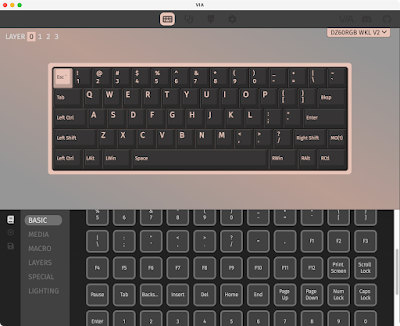
 So this took a little bit of figuring out. But I got there. Using VIA software to remap the D60Lite I first tried to flash the .hex file I built for my Tokyo60 boards , since both machines use the Mega32U4 I thought maybe ... But no:  Only firmware files in .bin format can be flashed with this bootloader! I eventually figured out how to do this (and it doesn’t involve QMK Configurator). The PCB for this kit identifies itself as a DZ60RGB WKL V2, which shows up on the list of VIA supported keyboards . A little bit of sleuthing led me to the KBDFans page for the DZ60RGB-ANSI v2 , which has a “ New Flash Manual ” that got me most of the way there. (Instead of using the dztech_dz60rgb_ansi_v2_via.bin firmware they provide, I used the dztech_dz60rgb_wkl_v2_1_via.bin file from https://www.caniusevia.com/docs/download_firmware .) Edit: A mod over at r/KBDFans suggested: “i would not recommend using the Via files from their website. Some of the files due to updates do not match up w...