Posts

Showing posts with the label Mechanical Keyboards

Making limited use of an Amazon Fire HD 8 (8th Generation) Tablet

Image
Decluttering, I found an old HD 8  (mine’s actually an 8th generation, one year newer than that SKU, but they’re both obsolete and discontinued, so whatever) that I’d apparently never even setup (or if I did, I’d factory reset it). It’s like 7 years old but the screen is immaculate and it seems to have a working battery, albeit not the strongest - as you’d expect. Anyway. It’s running Fire OS 7.3.2.9 with a build date of Decemer 5, 2023, 1:59 p.m., so I guess I did have it online at some point, long enough to update the system software. I’m told this software is a fork of Android Pie (a/k/a Android 9.0), which is getting fairly long in the tooth, but I have apps that will work on the much older Android 5 (Lollipop) (from my Nexus 7 restoration project ), so ...  The hardware isn’t anything to write home about either: 8-inch IPS LCD (1280x800); quad-core MediaTek MT8163B CPU; 1.5 GB RAM; 16GB internal storage (~12GB usable after factory reset); VGA front camera, 2MP rear ...

NuPhy Air 60 v2 (and the process for VIA mapping)

Image
Picked up the NuPhy Air 60 v2 , tweaked with shine-through keycaps (though oddly the set doesn’t include the right “shift” key, so I’m stuck using the old, colorway-mismatched, non-shinethrough cap for just that one key). I opted for the Moss switches , and so far I like them well enough. Anyway, I picked this up as my older Air 75 wasn’t physically compatible with my current laptops (daily drivers are a 2021 MacBook Pro 14" and an M2 Air 13.6"), and since I’ve gotten so used to HHKB layouts normally (several Tokyo 60s and a KeyChron Q60 Max, mostly), I wanted VIA remapping capability so at least I could, e.g., swap '|\' and 'backspace' (muscle memory is a bitch).  Air60 v2 on a 2021 14" MacBook Pro I got it. I finally got it figured out by actually, you know, reading the instructions . First you have to download a JSON file from Nuphy (is it NuPhy? IDK...), then toggle the Design Tab in settings under usevia.app, then upload the JSON in the Design Tab,...

Keyboard display / storage on IKEA Skådis pegboard

Image
Been meaning to do this for a while, if only to get them up off my flat surfaces. IKEA SKÃ…DIS pegboard and keybards   SKÃ…DIS Pegboard combination, white, 14 ¼x22 ($17) Connector , to mount it to the piece of scrap lumber pictured here ($6). Container , to hold switch lube, tools, etc. ($4). Ikea Skadis/Uppspel Keyboard Holder Set from Etsy seller AkosinCreations (4x $13).

Re-Springing and Fixing a Switch

Image
I was getting unintended double-input on the space bar on my blacked-out “Mac symbols” Tokyo60 (with the Kailh Box Hako Royal Clear switches ), so I decided to swap the spring with one from a Kailh Box Navy ( I made the same swap on a Durock Silent Shrimp used under the space bar on another keyboard , with great effect). The first swap was simple. This one, not as much; the switch sort of fell apart when I opened it, so I pulled another apart to see how to put it back together. To my astonishment, I got it right the first time; the switch is back working, and nicely stiff now. Yay for decent tools. Opened the Navy switch first to harvest its spring. See that little green thing in the switch housing? Not where it’s supposed to be. Another switch opened; that’s where that green thing is supposed to be... It gets sandwiched between the white plastic bit and the housing. Like this. Used this tool to put it back where it belonged.

Lubed or unlubed melons?!

Image
Screen shot of reaction video Okay, I have to admit, I found this hilarious. (For the record, I’ve never lubed or filmed a switch. But, before a few weeks ago, I’d never lubed a stabilizer either, and now I’ve done that for at least 6 keyboard builds, including going back and tearing apart my first Tokyo 60 to lube 'em after the fact). And until yesterday, I’d never opened a switch, but now I’ve done that too .) At least my least expensive custom was “only” about $110 (used Tokyo 60 kit on eBay, keycaps bought on sale from Drop, Kailh switches from Amazon - might have even been able to put it together a bit cheaper...) The keyboard hobby moves too quickly by u/BurnedR in MechanicalKeyboards

Remapping a KBDFans D60Lite with VIA

Image
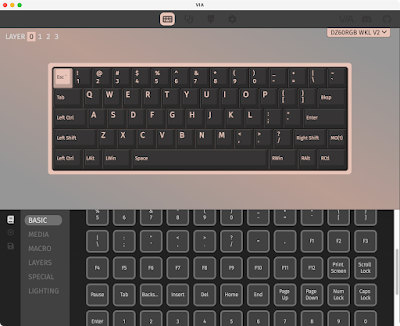
 So this took a little bit of figuring out. But I got there. Using VIA software to remap the D60Lite I first tried to flash the .hex file I built for my Tokyo60 boards , since both machines use the Mega32U4 I thought maybe ... But no:  Only firmware files in .bin format can be flashed with this bootloader! I eventually figured out how to do this (and it doesn’t involve QMK Configurator). The PCB for this kit identifies itself as a DZ60RGB WKL V2, which shows up on the list of VIA supported keyboards . A little bit of sleuthing led me to the KBDFans page for the DZ60RGB-ANSI v2 , which has a “ New Flash Manual ” that got me most of the way there. (Instead of using the dztech_dz60rgb_ansi_v2_via.bin firmware they provide, I used the dztech_dz60rgb_wkl_v2_1_via.bin file from https://www.caniusevia.com/docs/download_firmware .) Edit: A mod over at r/KBDFans suggested: “i would not recommend using the Via files from their website. Some of the files due to updates do not match up w...

HHKB Compatible Keycaps

Image
I’ve ordered this set: OEM Cherry Profile HHKB Layout Keycap | Top Printed Blank PBT Keyset | For MX Mechanical Keyboard DIY (OEM Dolch Top colorway) for $20, as a cheap way around the black-on-dark-grey Drop keycaps . I’m not smart, though; I had a moment of panic at seeing that the bottom row didn’t match, before realizing, duh, the caps are just photographed out of order and they’d mount just fine: AliExpress HHKB keycap set Other AliExpress kits I’ve found include this: HHKB Keycaps Cherry Profile PBT Material Fit Cherry MX Switches for MX Mechanical Keyboards Not for Static capacitance keyboards (7u Dye-sub Cherry)   I also have this kit coming, probably for my D60Lite board : YMDK MA Co2 Engraved Thick PBT Keycaps for HHKB Style Mechanical Keyboard Simiar to XDA Keycap Black (Black Co2 Etched) (probably the same as this ?). Not sure about the profile. I’m really digging the high profile MT3 I built the silver Tokyo60 with. I really want to find the SA Green Screen kit for ...

NuPhy Air 75

Image
Continuing my practice of distilling my stream of consciousness rambling down to the nuts and bolts of where I ended up... I was one of the early buyers of the NuPhy Air 75 (also available through Amazon , with prime shipping), and I opted for the brown switches. Didn’t love ’em. When they upgraded the logic board I asked and they sent me the revised board, gratis. When they released the shine-through keycaps , I bought them for $19. When they came out with new low profile Gateron switches, I picked up a set of the 55g Wisterias , and so far, I like them a lot more than the v1 browns (50g). They’re a bit stiffer, and I find I don’t have miskeys nearly as often, while the switches are still relatively quiet and not fatiguing. I dig this setup, both with MacBooks and with an iPad using the NuFolio V2 ( Amazon ) case. (I also picked up a set of Gateron blues , before the Wisterias were in stock; I wasn’t wild about putting clicky switches in this board (which, being so portable, I wa...

Keychron K10 with Kailh Pale Blue switches. Typing speeds.

Image
Keychron K10 in the middle of swapping to pale blue switches I was finding the GMMK full-sized keyboard with Kailh Box Navy switches a nice change, but also quite fatiguing after even just a few hours of typing. The Box Whites are way too light. The Pinks ... might be, too? Jades are pretty close to Navy switches. So I figured I’d try the Pale Blue switch again (I have them on a GK705, one of the first boards I setup almost exactly 2 years ago, but I don’t really use it much, it’s not a great board). (Hmm. I forgot I first setup the GMMK with Pale Blues ?). I don’t know if the switches have changed, or if using them with a Keychron ( K10J3 , RGB hot-swap aluminum, came with Gateron Browns that didn’t suck as much as I remembered (typed on them for a few days until the Pale Blue switches arrived) is that different, but, these are stiffer than I remember. Definitely lighter weight than the Navy switches, with a soft but distinct click as I type. Anyway. I like it so far. I’m definitely...

Tokyo60 build - an MX HHKB-style keyboard (also, how to assemble stabilizers)

Image
Tokyo60 (HHKB layout) assembled. I decided to see what all the fuss was about concerning the Happy Hacking Keyboard ( discussion ), a UNIX-centric keyboard layout. $300 or so for a Topre switch board was a bit on the steep side, so instead I found ... A Coyote kit , “Used – Acceptable,” for $90 ($80 less than regular price) (wouldn’t have been my first choice for a colorway, but needs must, no?) The DROP dyesub keycaps (again, wouldn’t have been my first choice, but these were relatively cheap, already setup for a HHKB layout (albeit with “Super” instead of ♢  ⌘ for the main meta key), $46 A set of 70 DROP (by Kailh) Halo Clear switches that I thought I would like but haven’t had a chance to really put through their paces ($43). The kit arrived without the screws to mount the PCB to the case ( DROP support was less than helpful, but I found this post that sent me in the right direction, and I’m ordering some MonsterBolts - M2 x 4mm Phillips Pan Head, DIN 7985A, Alloy Steel, Bla...

Installing Linux software. Sigh.

Image
It’s 2023, why is it still such a pain in the ass to get Linux software up and running? I have an Oracle Linux 8 server. (I know. But when CentOS 8 moved to a rolling release ...) Not a lot is natively packaged for it, but it all should still work. But, case in point, getting fslint (a file deduplicator ) running. Or, not, as the case may be. I tried installing it via yum. No go, it’s not in the repositories. Okay. Try a binary release for czkawka 4.1.0 (the rust re-implementation that’s more actively developed). Nope, I don’t have gtk4. Okay, try 3.3.0. Nope, wants glibc 2.29, I have 2.28, and there’s no easy way to get 2.29 installed. Okay, this seems like the perfect opportunity to learn how to use snaps . Everything seemed to go smoothly until I used XQuartz terminal to `ssh -Y` into the server to launch the software: # snap list Name                Version        ...

Keychron K3

Image
This Keychron K7 (a low profile 75% board) is my second low profile keyboard (third, if you count the F1 I tried and resold). I don’t think this profile will ever be my first choice, to be honest (so far, my favorite daily drivers are the TKL Keychron K8 with Boba U4 62g switches, and a 75% Keychron K2 with Kailh Box Royal switches). But for very specific applications, like sitting on top of a MacBook (Air) to provide a mechanical keyboard experience , or to fit easily under a Rigg Monitor Mount , well, sometimes needs must. I picked up a “used – like new” K3 at a significant discount on Amazon (white backlight; would have preferred RGB, but beggars can’t be choosers).  It’s the optical switch version (hot swappable), and came with the Keychron “blue” switches, which require a very light touch (48g). After an evening I was getting somewhat used to them, but if I was going to stay clicky with this board I’d be seriously tempted to swap in the orange switches (55g). As I’ve recentl...

Couch Desk

Image
Assembled laptop table with 11" Air, K6, M535 Never could quite get the Foldable Laptop Desk to balance properly on my sofa, and it kept things in too close to my chest in any case. The LapGear MyDesk is fine for what it is, but a bit awkward, and if a laptop isn’t compatible with the Air 75, doesn’t provide a mechanical keyboard option. Also, not the best for head position / sight line. Now, though, I’ve assembled the GOAT. The original plan was to get any adjustable height ‡ desk ( e.g. ) and bolt a VESA mount ( e.g. ) to it. But that just seemed clumsy, too/top heavy, and overkill (my svelte Apple hardware just doesn’t require the hardware to support > 17 lbs). This solution appealed as it extends over the couch and has a built-in pole for VESA mounting. I started with the Viozon Floor Stand for Laptop , UP-8T, which provides a 1.5" diameter pole that holds the desk surface. I measured the space under my sofa and confirmed the 0.6" thick feet would slide underne...