Posts

Showing posts with the label keychron

My Schiit Hel+ was fine (?!); my Q60 Max is forgetful

Image
Back in January I sent off a Schiit Hel 2E to be repaired. It had just stopped supplying a signal to the headphones (was still being recognized by the computer when connected via USB). In February, I got it back, with a swapped board and a new serial number sticker - it’s now a Hel+ . According to the support person I swapped emails with, all their repairs have a one (1) year warranty – good thing, since it just started doing exactly the same thing as before . I can hear the relay inside clicking, so it’s getting power. I can see it on the computer when USB connected. But no audio. Meh. Just sent it back today, this time to Corpus Christi, Texas. I guess the move is complete, or nearly so. (They used to be just over the hill from me, in Valencia, California.) Sigh. So now I’m limping along with my Fulla E, which has never given me any issues (but is very lightly used; after I got the Hel for the office I moved the Fulla E to my “kitchen table workstation,” which has since been disman...

Remapping the Keychron Q60 Max

Image
For some reason the VIA app and https://usevia.app don’t work to remap the keys on a Keychron Q60 Max (usevia.app sees the keyboard but never moves past the Authorize device screen, even after a firmware update). usevia.app sees the board but is stuck However, Keychron’s own web software does:  https://launcher.keychron.com/#/keymap  Unfortunately, though there appears to be some JSON support buried in Settings, it doesn’t appear you can export or import a configuration. Here’s my refined-over-time mapping of Layers 0 and 2 (Layer 1 is the “Win” layer on this board, which has a Win/Mac hardware switch on the back). I remapped this board back in June but there were a few keys I hadn’t tweaked; I’ve fixed that and am posting this for my own recollection if nothing else: Layer 0 keymap Layer 2 keymap Also, the keyboard seems somewhat finicky as to the USB-C cable that will work with it. A 10' (whoops?) Anker cable that works fine to power the laptop didn’t register the keyboa...

Keychron strikes again; macOS Bluetooth codec frustration; Blink camera battery life; and more!

Image
Qualcomm QCC5125 Package I got the BLT-2 (which apparently uses a Qualcomm QCC3034 chipset) in the mail today, and hooked it up. The manual I found online says it can work between two phones, but the manual for the device I got says it will remember up to 8 devices. Since I want it to work with both whatever laptop I might be cranking on, or at other times my phone, that’s perfect. So I set up my phone and my work MacBook Pro M1 Pro 14". A quick look at Console.app and it appears it’s still using the SBC codec - WTF? Digging into that. (Seems to be a common complaint, and the how to fix guides are all outdated .)  https://gist.github.com/dvf/3771e58085568559c429d05ccc339219?permalink_comment_id=4078721 Update: My Macs connect to many devices using AAC, including: A Loxjie A40 ( log ) (Qualcomm QCC5125) A FiiO BTR5-2021 ( log ) (Qualcomm CSR8675) EarStudio ES100 ( log ) (Qualcomm CSR8675) I’ve ordered a Blafili B3 (which apparently uses the QCC5125), fingers crossed. Blafili sup...

Remapping the Q60, repotting the Jade

Image
Today was too hot to sit inside, and I was too fried to bike to the office, so I setup on the balcony. Balcony workstation: MacBook Pro, MOFT Z stand, Q60 keyboard, etc. The setup: MacBook Pro 14" M1 Pro resting atop a MOFT Z Invisible Thin Sit-Stand Desk to bring it up to eye level. Keychron Q60 Max keyboard (the only wireless HHKB layout board I have); Gateron Jupiter Banana switches ( 59±10 gf tactile switches with 2.0±0.6 mm pretravel, 3.4 mm max total travel, with a “crisp bump, tactile bump at top” feel; they’re not my endgame switch, but I quite like them, especially in this keyboard). Logitech M585 Wireless Mouse, Graphite . Desk pad . Sukadar Portable Clip on Fan, 10000mAh Rechargeable Battery Operated (really like this fan!). Zendure SuperTank Pro (which appears to be discontinued; not a fan of how Zendure handled a warranty claim , so, whatever...) Sport-Brella Versa-Brella SPF 50+ Adjustable Umbrella with Universal Clamp . The combination makes for a very cozy, co...

Redoing my workstation (UpLift desk, Aeron chair)

Image
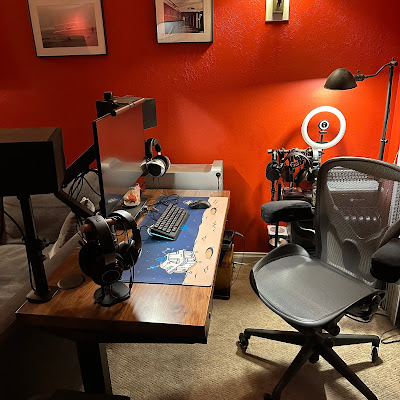
Done. I mean, it’ll probably always be a work in progress, but I’m done tweaking the space for now. Really happy with how everything came out. The workstation corner. The workstation corner and new sofa (featuring the Labrador) The Mac Pro (etc.) battlestation itself. The wire shelves, storage boxes, Tokyyo60 keyboards, headphones on stand, and radiator. The Desk: UpLift. UpLift Desk Redoing my home workstation (again), finally with a sit-stand desk (I’ve been meaning to do this for years , like, I found a Facebook post from 2014 asking for recommendations, back when my other furniture only provided a tiny space and UpLift didn’t have anything that would fit). I love my Sipo Mahogany 72x48" desk at the office (from 2016), so ... I started with a 48x24" solid wood UpLift desk from their clearance section , with an October coupon code. Went with the regular (non-commercial) V2 C-frame in black. Added the Advanced Comfort Flush keypad (the memory feature is worth $39 to me, v...

Keychron K10 with Kailh Pale Blue switches. Typing speeds.

Image
Keychron K10 in the middle of swapping to pale blue switches I was finding the GMMK full-sized keyboard with Kailh Box Navy switches a nice change, but also quite fatiguing after even just a few hours of typing. The Box Whites are way too light. The Pinks ... might be, too? Jades are pretty close to Navy switches. So I figured I’d try the Pale Blue switch again (I have them on a GK705, one of the first boards I setup almost exactly 2 years ago, but I don’t really use it much, it’s not a great board). (Hmm. I forgot I first setup the GMMK with Pale Blues ?). I don’t know if the switches have changed, or if using them with a Keychron ( K10J3 , RGB hot-swap aluminum, came with Gateron Browns that didn’t suck as much as I remembered (typed on them for a few days until the Pale Blue switches arrived) is that different, but, these are stiffer than I remember. Definitely lighter weight than the Navy switches, with a soft but distinct click as I type. Anyway. I like it so far. I’m definitely...

Keychron K3

Image
This Keychron K7 (a low profile 75% board) is my second low profile keyboard (third, if you count the F1 I tried and resold). I don’t think this profile will ever be my first choice, to be honest (so far, my favorite daily drivers are the TKL Keychron K8 with Boba U4 62g switches, and a 75% Keychron K2 with Kailh Box Royal switches). But for very specific applications, like sitting on top of a MacBook (Air) to provide a mechanical keyboard experience , or to fit easily under a Rigg Monitor Mount , well, sometimes needs must. I picked up a “used – like new” K3 at a significant discount on Amazon (white backlight; would have preferred RGB, but beggars can’t be choosers).  It’s the optical switch version (hot swappable), and came with the Keychron “blue” switches, which require a very light touch (48g). After an evening I was getting somewhat used to them, but if I was going to stay clicky with this board I’d be seriously tempted to swap in the orange switches (55g). As I’ve recentl...

Rigg Monitor Mount

Image
Rigg Monitor Mount with keyboard, monitor, mouse, battery Okay, here’s the final form. I rotated the legs of the  Rigg Monitor Mount around the cross-bar (see below), providing ample room for at least a 75% keyboard (pictured is a Keychron K2 with Kailh Box Royal switches). I have the AVLT Thin Client VESA Mount attached to the Rigg Monitor Mount backplate, holding a MacBook Air retina and mounting a UPERFECT 15.6 monitor, which looks and works great. The cheap iPhone mount is currently supporting a Zendure X5 battery pack (USB-C PD45W; looks like it might be discontinued, but the X3 would work, too). I have the laptop linked to the display with a cheap short USB-C cable ; the battery is connected with another cheap, short-ish USB-C cable . How I got here. I was intrigued by the Rigg Monitor Mount . (I paid $79 for it on Amazon , and now see today it’s selling for $59.) An answered question on Amazon (by the vendor) says: “There are about 15" inches (38cm) in between the f...