Posts

Showing posts with the label USB-C

Okay, fine, I’m getting a streamer

Image
After stripping everything down to minimalism to comfortably host Thanksgiving this year, I’ve decided to redo my reading/listening station . Getting rid of the IKEA side table, the clusterfuck of cables, etc., and getting down to basics. Moving the Schiit stack to the built-in bookshelves, which aren’t deep enough to comfortably host the Mac Mini, let alone the shelf I built . Also ditching the iPhone 12 setup, since I just never really used it. But I still do want streaming capability. (I tried, I really tried, to use / like the Logitech Media Server setup on the mini, but, alas.) Wiim Pro Enter the streamer After too much research, and considering the Arylic S10+ and LP10, and the Eve Play, and some other devices, I settled on the WiiM Pro , especially once Amazon dropped it from $150 to $125, a pretty good price . If I ever use Spotify, it integrates (though I probably won’t ), and apparently it works with the Pandora and SiriusXM I do  have ... But mostly I anticipate using it...

Charging an Apple Silicon MacBook Air

Image
Following up from my earlier observations ; a 13.6" MacBook Air M2 seems to settle around 65W (on an  Anker 100W charger , observed using a SABRENT cable with a built in display ) while charging from 37% SOC and being used with, e.g., a Bluetooth keyboard  ( 5.1 ) and mouse  ( BLE ), WiFi, and screen brightness turned up (while listening to streaming music via hardwired headphones ). So while 30W is what it shipped with[1], and what can reliably power and charge it, the modern Airs will take advantage of more power if its on tap - at least up to a point. MacBook Air M2 13.6" consuming 65W USB-C PD So, battery packs like the Zendure SuperTank Pro and Shargeek Storm 2 , Shargeek 140 , or even the Anker 20,000mAh Power Bank (A1383) (for basically one recharge, or a partial top-off if charging while using the computer), are still worth toting, even if I could get by with something with lower power output.

Solterra USB-C port charger specs

Image
On a 2024 Solterra Limited I did some light testing with a Klein ET920 meter  and think I have the capabilities figured out (I couldn’t find the specs anywhere). Solterra Limited USB-C port providing 5V⎓3A Testing with a ~50% charged iPhone 16 Pro, the Klein showed the Solterra delivering 5V and about 2A (and the Baseus PD 100W fast charging USB C cable with LED display cable was reporting 10W). Hooking up an M2 MacBook Air (also around 50% charged) saw 4.88V but drawing around 2.90A and the cable reported 13W. MacBook Air receiving 13W from the built-in USB-C port   So it seems like the Solterra USB ports are limited to 5V and up to 3A depending on what the device will pull. Meanwhile, I hooked up a $12 Anker 323 car charger (52.5 W) (model A2375; apparently, Anker has reused the 323 designation for multiple products), and ran its output through the Klein. The Anker’s output capabilities are listed as: USB-C: 5V⎓3A / 9V⎓3A / 12V⎓2.5A / 15V⎓2A / 20V⎓1.5A (30W Max) USB-A: 5V⎓...

NetBook word processing

Image
Getting ready for NaNoWriMo. The BYOK isn’t out yet. I’m not going to drop $350 on something like a Freewrite Alpha , as cool as I think it is. But I have an old IdeaPad S10 netbook (10.2" 1024x600 screen, surprisingly good keyboard, Atom processor, 2.5 GB RAM, whatever old SATA SSD I had close at hand, and I picked up this DC 5.5x2.5mm to Type C USB cable , which so far works perfectly to charge and power the thing).  IdeaPad S10 netbook   Now I’m on the hunt for a decent Linux distribution (probably DSL 2024 ), and word processing software : I’ll probably end up with AbiWord , but old WordPerfect is still a contender (was using it for years on my 1024x768 VAIO PCG-Z505R), and FocusWriter looks interesting. LibreOffice is probably too heavy. Was not previously aware of FreeOffice TextMaker before, but I should check it out at some point It just needs to provide a relatively distraction-free writing environment that I can work on whenever I have spare time; think this’ll wo...

USB-C Extension Cable for Power Delivery

Image
After seeing the impact a dual Xeon RX 580 GPU etc. Mac Pro 5,1 had on my electric bill, I’m spinning that beast up only when necessary! So I’ll be using the laptop slot I had built into my computer stand more and more. Which means having power cables draped everywhere from the grommet insert is less than ideal. So...  Anker MacBook Pro Charger, 100W USB C ($30 and comes with a 5' USB-C cable) Faracent USEC-2M 2 meter USB-C extension cable ($14 and purportedly transmits up to 5A, so, a full 100W ) The extension cable is necessary so I can have the wall wort plugged into the UPS on the floor and have an easily accessible USB-C female port I can plug a USB-C to USB-C cable, or for older and newer devices, a MagSafe cable, into, depending on what laptop is in the slot. I currently have it hooked up to a MacBook Pro 14" M1 Pro via an Apple MagSafe 3 cable and can confirm it’s negotiated 19.5V and ~.25A (which is what it was drawing connected to a 67W charger USB-C to USB-C, no ...

Replacing the Zendure X5: Anker 20,000mAh Power Bank (A1383)

Image
The Zendure X5 was a pretty unique package, and I’ll miss it (it died and they were not able to replace it under warranty 😢). The best compromise I found to replace it was the Anker Power Bank, 20,000mAh Portable Charger with Built-in USB-C Cable, 87W Max Fast Charging Battery Pack (A1383) for about $60. It’s a little bigger and heavier, but Anker packs tend to have good efficiency ( comparison ), and the power profiles available mean I should definitely be able to properly fast-charge a tablet with enough juice to spare for a top-off of an iPhone, etc. Anker 20,000mAh PowerBank (The new pack is 6.2x2.9x1" (vs. 4.5” x 2.8” x 1”) (so, ~43% larger on the Cocoon ), and 15.5 oz/ 440 grams (vs. 10.41 oz / 295 g) (so, ~49% heavier). Not super small or light weight, but to get no-compromises high speed charging for both the battery pack itself and a connected tablet, plus > 60 Wh of usable capacity, that’s what’s out there. Everything else has a severely charging capability ...

Travel and Home Chargers

Image
Anker 615 USB Power Strip Picked up the Anker 615 (A9125) for my “ remote office .” Love this gadget. Manual . Wraps up neatly to travel compactly, but once on site the cord unwraps to 3' in length, with (2) 125V AC outlets and a combination of USB ports that can provide up to 65W USB-C PD, or a more usable 45W on one and 18W on the other, or (still enough to run a MacBook Air, recharge an iPad, and ...) 30W/20W/12W with all three USB ports occupied: USB-A: 5V ⎓ 2.4A (12W max) USB-C 1 / USB-C 2: 5V ⎓ 3A/9V ⎓ 3A/15V ⎓ 3A; 20V ⎓ 3.25A (65W max each port)  USB-C 1 + USB-C 2: USB-C 1: 5V ⎓ 3A/9V ⎓ 3A/15V ⎓ 3A/20V ⎓ 2.25A (45W max) USB-C 2: 5V ⎓ 3A/9V ⎓ 2A (18W max) USB-C 1 + USB-C 2 + USB-A: USB-C 1: 5V ⎓ 3A/9V ⎓ 3A/15V ⎓ 2A/20V ⎓ 1.5A (30W max) USB-C 2: 5V ⎓ 3A/9V ⎓ 2.22A (20W max) USB-A: 5V ⎓ 2.4A (12W max) USB-C 1 / USB-C 2 + USB-A: USB-C 1 / USB-C 2: 5V ⎓ 3A/9V ⎓ 3A/15V ⎓ 3A/20V ⎓ 2.25A (45W max) USB-A: 5V ⎓ 2.4A (12W max) Anker 525 Charging Station Definitely a usable gizmo. Not ...

Charging a MagSafe 1 or MagSafe 2 MacBook or MacBook Air with USB-C PD

Image
MacBook Air charging via USB-C to MagSafe 1 cable This is a concise summary post; if you want the details of how I got here, and the technical specs beneath everything, click here . My setup: Zendure SuperTank Pro or Shargeek Storm 2 , each of which can supply up to 5A at 20V, for up to 100W. (Any battery pack that can deliver at least 20V ⎓ 3A (60W) will work.) These are about $170 on sale (which happens regularly). AreMe USB C to Magnetic L-Tip Charging Cable (MagSafe 1 for my 2010 Air) $13. AreMe USB C to Magnetic T-Tip Charging Cable (MagSafe 2 for my 2012 13" Air, 2015 11" Air) $13. Works better than I’d expected, charged from 71% to 100% (as reported by macOS) in about 40 minutes. It took a bit longer to trickle-charge up to an actual 100%, at least as reported by coconutBattery. This is definitely going to be a “go-to” travel solution, especially for higher risk environs (theme parks...). The one caveat, opposite to the Amazon listing and the usual operation of Appl...

USB-C to MagSafe 1 and MagSafe 2 Mac Laptops

Image
And we come ’round full circle ... My foray into USB-C battery packs (and upgrading to 2020+ Apple hardware, decent keyboards and USB-C charging without an intermediate inverter and AC adapter) all started with wanting a portable setup for a full day of (at least intermittent) computing without access to a 110V socket. Back then, a USB-C to MagSafe 1/2 adapter seemed like a not great idea (ignoring all the negative reviews), as I didn’t have a battery pack that could deliver 60+ watts continuous. But now I’ve got several ( Zendure SuperTank Pro , Shargeek Storm 2 , etc). The MagSafe connector actually has a bit of intelligence built in: Teardown and exploration of Apple's Magsafe connector . Meanwhile, the power profiles appear to be pretty straightforward: MagSafe 2 85 W: 20V ⎓ 4.25A MagSafe 85 W: 18.5V ⎓ 4.6A / 16.5V ⎓ 3.65A MagSafe 2 60W: 16.5V ⎓ 3.65A MagSafe 60W: 16.5V ⎓ 3.65A MagSafe 2 45W: 14.85V ⎓ 3.05A MagSafe 45W: 14.5V ⎓ 3.1A The two 100W ports of the SuperTank Pro su...

Travel Office

Image
Tripodsy standing desk with MacBook Pro A trip to Mammoth validated my concept of a portable office. (Of course, this trip we ended up in a condo with a desk, making the standing desk less of a requirement - though still useful - and rendered the collapsible stool superfluous. But, this condo doesn't have a Keurig, so now I’m thinking: Amazon Basics Compact Dual Brew Single Serve Capsule Coffee Maker . But I digress.) Stuck inside while an atmospheric river dumps snow outside (the picture here was taken on the third floor!), I’m getting work done with the following setup: Tripodsy standing desk , that I carried up in a 24" duffel bag : Apple MacBook Pro 14" with a ShaggyMax screen protector and Speck FlapTop sleeve (says it’s for the 13" Air and it fits that, too, bu the MBP 14" fits perfectly). NuPhy Air75 with brown switches, shine-through keycaps and revised logic board . (I’m not sure I’d use this keyboard like this again. The brown switches aren’t my ...

Living Room Charging Station

Image
Side table charging station tucked into corner; Anker charging station The station is built around a $35 HOOBRO Side Table with Charging Station, End Table with USB Ports and Outlet , which won’t be confused for Ethan Allen but snuggles into the available space perfectly and looks “fine.” (Certainly a lot better than the rat’s nest of cables that used to be in that void!) Also gives me a place to stash laptops, tablets, wireless keyboards, etc., that’s out of the way. The table has a built-in 110V outlet and (2) 10W (5V ⎓ 2A) USB-A ports, which is probably enough for impromptu / guest phone / watch / etc. recharging, but wasn’t quite what I needed from that space. So I added an Anker USB C Desktop Charging Station (623), with: (3) 110V outlets; (1) USB-C PD 45W port; and (2) 15W USB-A ports. Although the power strip’s USB output tops out at 60W total (per the manual ), and 45W isn’t the most a MacBook Air can take (and less than the stock charger for the MacBook Pro provides), 45W of ...

Moar USB-C Charging / Battery Packs / Solar Exploration / Rechargeable AAs

Image
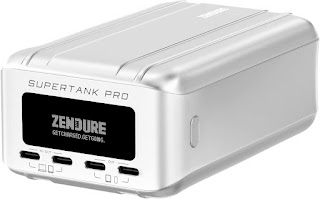
Zendure SuperTank Pro Zendure SuperTank Pro I’m still enamored with the Zendure X5, but I went looking for a solution with at least 2 USB-C PD outputs, that could power both a MacBook Air and a 15.6" UPERFECT portable monitor (that I expect will become part of a flexible sit-stand setup ). The Zendure SuperTank Pro 100W PD 26800mAh power bank seems to have glowing reviews and the specs are there (and I like the OLED screen that shows what each port is delivering, how many watt hours of charge are remaining, etc), and Amazon had it as a lightning sale item marked down from $229 to $169, so I decided to take the plunge. Update: The SuperTank arrived today. To my surprise, it came with a carrying case, a USB-C to USB-C cable, and a USB-C to USB-A adapter. I hooked it up to the UGREEN 100W charger through the Klein and observed it charging (it came with about a 36% charge, and Zendure recommends fully charging it before use). Using the red 60W-rated cable showed 56.0W on the SuperT...

Issues with macOS Ventura

Image
I found a good deal on an almost maxed out Intel MacBook Air 2020 (Core i7-1060NG7 @ 1.20GHz, 16GB RAM, 512GB SSD) and set it up today. I figured, since it’s fully supported, I’d start this one off on Ventura (macOS 13) from day one. It came wiped to a fresh install of Monterey (macOS 12). First I tried to do the ⌘⌥R restore method to install the latest operating system, but every time after about a half hour or so I’d get an error -2005F error and could go no further. (A little digging suggests that that error is WiFi related ? Wireless here isn’t awesome, I see 49 networks sitting in my living room, 21 of then 2.4 GHz, 28 in the 5 GHz band; there are no channels free from interference.) Tried both 2.4 and 5 GHz networks before giving up and completing the setup for Monterey, and then using Software Update to install Ventura. This was a mistake. I had the same issue this user had , where most of the .pkg files I tried to install (e.g., OpenJDK8U-jdk_x64_mac_hotspot_8u345b01.pkg ), ...

Anker Nano 3: Tiny, cheap, USB-C charger for a MacBook Air

Image
The Anker 511 Charger (Nano 3, 30W) Powering a MacBook Air Just a shout-out to this tiny little Anker USB C GaN Charger 30W, 511 Charger (Nano 3) charger (hooked it up to an early 2020 MacBook Air via an inexpensive Amazon Basics Fast Charging USB-C to USB-C2.0 Cable (USB-IF Certified), 60W - 10-Foot, White . Not much to say other than that it works. The Klein reports it supplying 19.92V at 1.40A (27.9W); coconutBattery reports the laptop charging with 8–15W (or more) while tapping this (Bluetooth keyboard) and streaming a high definition YouTube video over WiFi. It’s about 1/3 the size of the charger Apple bundles with the laptop, and makes a cost-effective option to keep a charger in another location. Dig it. Specs from the manual: Input 100-240V⏦1A 50-60Hz Output     5V⎓3A / 9V⎓3A / 15V⎓2A / 20V⎓1.5A (30W Max) PPS: 3.3-11V⎓3A Max (30W Max) 3.3-16V⎓2A Max (30W Max) Average Active Efficiency 82.24% Efficiency at Low Load (10%) 70.14% No-Load Power Consumpti...