Posts

Showing posts with the label Sit-Stand

Revisiting the Tripodsy portable sit-stand desk

Image
About two and a half years ago I stumbled across the ideal (for me) portable sit-stand laptop stand , the TRIPODSY. I still have it and still love it, but there’s a problem: It seems to have disappeared and been scrubbed from the Internet. It came with a set of instructions (see below) that included a QR code linking to a YouTube “ video instruction ,” but that video is now private. The Amazon link is now a “ Projector Tripod Stand .” Only a few remnants exist (including this since-sold OfferUp listing ). So I guess now I’m just archiving knowledge here for anyone lucky enough to have snagged one when they were around. Other options exist: The “ StandMore Portable Standing Desk with Keyboard Tray ” ($190) is the Tripodsy under a different name. Looks identical. The Tripod Standing Desk ($220) and 17x8" keyboard platform ($50) ($270 + shipping?) is still apparently available. (There’s also the $400 “Pro” version.) A  redditor put together something roughly comparable  (...

Remapping the Q60, repotting the Jade

Image
Today was too hot to sit inside, and I was too fried to bike to the office, so I setup on the balcony. Balcony workstation: MacBook Pro, MOFT Z stand, Q60 keyboard, etc. The setup: MacBook Pro 14" M1 Pro resting atop a MOFT Z Invisible Thin Sit-Stand Desk to bring it up to eye level. Keychron Q60 Max keyboard (the only wireless HHKB layout board I have); Gateron Jupiter Banana switches ( 59±10 gf tactile switches with 2.0±0.6 mm pretravel, 3.4 mm max total travel, with a “crisp bump, tactile bump at top” feel; they’re not my endgame switch, but I quite like them, especially in this keyboard). Logitech M585 Wireless Mouse, Graphite . Desk pad . Sukadar Portable Clip on Fan, 10000mAh Rechargeable Battery Operated (really like this fan!). Zendure SuperTank Pro (which appears to be discontinued; not a fan of how Zendure handled a warranty claim , so, whatever...) Sport-Brella Versa-Brella SPF 50+ Adjustable Umbrella with Universal Clamp . The combination makes for a very cozy, co...

Redoing my workstation (UpLift desk, Aeron chair)

Image
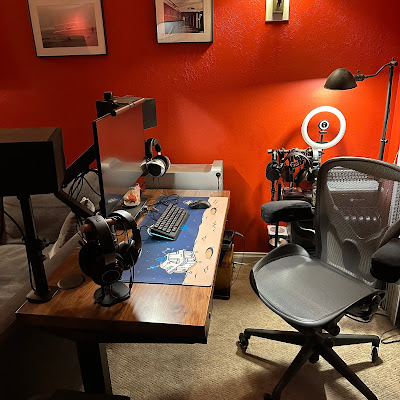
Done. I mean, it’ll probably always be a work in progress, but I’m done tweaking the space for now. Really happy with how everything came out. The workstation corner. The workstation corner and new sofa (featuring the Labrador) The Mac Pro (etc.) battlestation itself. The wire shelves, storage boxes, Tokyyo60 keyboards, headphones on stand, and radiator. The Desk: UpLift. UpLift Desk Redoing my home workstation (again), finally with a sit-stand desk (I’ve been meaning to do this for years , like, I found a Facebook post from 2014 asking for recommendations, back when my other furniture only provided a tiny space and UpLift didn’t have anything that would fit). I love my Sipo Mahogany 72x48" desk at the office (from 2016), so ... I started with a 48x24" solid wood UpLift desk from their clearance section , with an October coupon code. Went with the regular (non-commercial) V2 C-frame in black. Added the Advanced Comfort Flush keypad (the memory feature is worth $39 to me, v...

Tidy Desk Intention

Image
My desk, my browser windows overflowing with open tabs ... Too much clutter. Next week we’re rolling out practice management software ( finally ). Now is the time: Everything gets cleaned and kept clean. Minimal. Spaces used for working, for doing, not cluttered as unintentional storage. From Spring Cleaning: 7 Things in the Office That Need to Go! , the what: Digital Clutter: Doing okay with this. I only keep currently active files on my workstation / laptop, sync handled by NextCloud. I back up regularly to our server, and archive old files to the server as well. When we move to a cloud-based solution, this will be even more clean. Desk Clutter: This. OMG so much this. “Your desk should be a workspace, not a storage space. Clear off your desk, and only keep the essentials within reach. At the end of every day, try to clear off everything but the one or two tasks you plan to focus on first thing in the morning.” Unhelpful Alerts: I already have most notifications turned off, and hav...

Travel Office

Image
Tripodsy standing desk with MacBook Pro A trip to Mammoth validated my concept of a portable office. (Of course, this trip we ended up in a condo with a desk, making the standing desk less of a requirement - though still useful - and rendered the collapsible stool superfluous. But, this condo doesn't have a Keurig, so now I’m thinking: Amazon Basics Compact Dual Brew Single Serve Capsule Coffee Maker . But I digress.) Stuck inside while an atmospheric river dumps snow outside (the picture here was taken on the third floor!), I’m getting work done with the following setup: Tripodsy standing desk , that I carried up in a 24" duffel bag : Apple MacBook Pro 14" with a ShaggyMax screen protector and Speck FlapTop sleeve (says it’s for the 13" Air and it fits that, too, bu the MBP 14" fits perfectly). NuPhy Air75 with brown switches, shine-through keycaps and revised logic board . (I’m not sure I’d use this keyboard like this again. The brown switches aren’t my ...

Rigg Monitor Mount

Image
Rigg Monitor Mount with keyboard, monitor, mouse, battery Okay, here’s the final form. I rotated the legs of the  Rigg Monitor Mount around the cross-bar (see below), providing ample room for at least a 75% keyboard (pictured is a Keychron K2 with Kailh Box Royal switches). I have the AVLT Thin Client VESA Mount attached to the Rigg Monitor Mount backplate, holding a MacBook Air retina and mounting a UPERFECT 15.6 monitor, which looks and works great. The cheap iPhone mount is currently supporting a Zendure X5 battery pack (USB-C PD45W; looks like it might be discontinued, but the X3 would work, too). I have the laptop linked to the display with a cheap short USB-C cable ; the battery is connected with another cheap, short-ish USB-C cable . How I got here. I was intrigued by the Rigg Monitor Mount . (I paid $79 for it on Amazon , and now see today it’s selling for $59.) An answered question on Amazon (by the vendor) says: “There are about 15" inches (38cm) in between the f...