Posts

Showing posts with the label NuPhy

NuPhy Air 60 v2 (and the process for VIA mapping)

Image
Picked up the NuPhy Air 60 v2 , tweaked with shine-through keycaps (though oddly the set doesn’t include the right “shift” key, so I’m stuck using the old, colorway-mismatched, non-shinethrough cap for just that one key). I opted for the Moss switches , and so far I like them well enough. Anyway, I picked this up as my older Air 75 wasn’t physically compatible with my current laptops (daily drivers are a 2021 MacBook Pro 14" and an M2 Air 13.6"), and since I’ve gotten so used to HHKB layouts normally (several Tokyo 60s and a KeyChron Q60 Max, mostly), I wanted VIA remapping capability so at least I could, e.g., swap '|\' and 'backspace' (muscle memory is a bitch).  Air60 v2 on a 2021 14" MacBook Pro I got it. I finally got it figured out by actually, you know, reading the instructions . First you have to download a JSON file from Nuphy (is it NuPhy? IDK...), then toggle the Design Tab in settings under usevia.app, then upload the JSON in the Design Tab,...

NuPhy Air75 v2

Image
NuPhy Air75 v2 Basalt Black NuPhy has upgraded the Air75, a keyboard I’ve been futzing around with for about two years , recently releasing the Air75 v2 . In so doing, they appear to have addressed my critiques, including: Compatibility with the newer MacBooks with “Airfeet v3” ... These are foldable, too, not the easily lost magnetic risers from the earlier Air 75. (To their credit, NuPhy sold me several for a reasonable sum, like $8?, when I asked. But I’d much rather not have to even worry about losing feet.) VIA programmable, important as I’ve gotten very used to the HHKB layout, but the boards aren’t that portable. I can at least approximate it with VIA mapping, without having to deal with the kludge that is Karabiner on every machine I might use with it. New switches. I already swapped my Air75 to Wisteria switches , which were better, but now there’s a Moss option (60gf operating force), which might be even better still: “Taking a page from Gateron’s Baby Kangaroo, Moss is the ...

NuPhy Air 75

Image
Continuing my practice of distilling my stream of consciousness rambling down to the nuts and bolts of where I ended up... I was one of the early buyers of the NuPhy Air 75 (also available through Amazon , with prime shipping), and I opted for the brown switches. Didn’t love ’em. When they upgraded the logic board I asked and they sent me the revised board, gratis. When they released the shine-through keycaps , I bought them for $19. When they came out with new low profile Gateron switches, I picked up a set of the 55g Wisterias , and so far, I like them a lot more than the v1 browns (50g). They’re a bit stiffer, and I find I don’t have miskeys nearly as often, while the switches are still relatively quiet and not fatiguing. I dig this setup, both with MacBooks and with an iPad using the NuFolio V2 ( Amazon ) case. (I also picked up a set of Gateron blues , before the Wisterias were in stock; I wasn’t wild about putting clicky switches in this board (which, being so portable, I wa...

Travel Office

Image
Tripodsy standing desk with MacBook Pro A trip to Mammoth validated my concept of a portable office. (Of course, this trip we ended up in a condo with a desk, making the standing desk less of a requirement - though still useful - and rendered the collapsible stool superfluous. But, this condo doesn't have a Keurig, so now I’m thinking: Amazon Basics Compact Dual Brew Single Serve Capsule Coffee Maker . But I digress.) Stuck inside while an atmospheric river dumps snow outside (the picture here was taken on the third floor!), I’m getting work done with the following setup: Tripodsy standing desk , that I carried up in a 24" duffel bag : Apple MacBook Pro 14" with a ShaggyMax screen protector and Speck FlapTop sleeve (says it’s for the 13" Air and it fits that, too, bu the MBP 14" fits perfectly). NuPhy Air75 with brown switches, shine-through keycaps and revised logic board . (I’m not sure I’d use this keyboard like this again. The brown switches aren’t my ...

NuPhy Halo 75 and Baby Kangaroo Switches

Image
NuPhy Halo 75 with Shine-Through Keycaps During the Black Friday weekend, I broke down and pre-ordered the NuPhy Halo 75 , with the free shine-through keycaps and Baby Kangaroo tactile switches . It was supposed to ship 12/9 but actually started its journey on the 30th and got here on the 11th. The Halo 75 is a larger version of the Halo 65 , which has gotten rave reviews . There’s not a lot I can say about this thing that others haven’t said already . This thing is a chonky beast. Easily the heaviest, most solid-feeling keyboard I have, and the sound - even with the lighter weight shine-through ABS keycaps, is delightfully thoccy, but light and crisp. I didn’t need another keyboard, but I’m glad I splurged. Besides the Baby Kangaroo (“BBK”) switches I ordered, the other options were Gateron Pro brown/red (BTDT), Night Breeze (linear), Baby Raccoon (linear), and Rose Glacier (tactile). The board came with a switch tester that also included a Gateron Pro blue switch (clicky, yawn). I ...

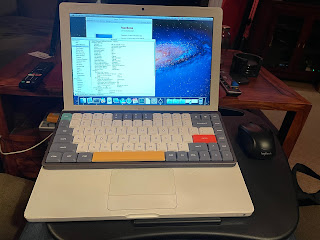
The ultimate lap desk setup.

Image
I’ve been trying to find a good “kick back on the sofa with the dogs and still get work done” solution that doesn’t kill my back, neck, etc. I think I may have found it: Any Mac laptop (or any laptop, really) with a compatible keyboard (basically, anything with the chiclet keyboard made between 2006 and, as I understand it, 2019 - I’ve used it successfully now with 2020-era Intel MacBook Air laptops, too). In this instance I’m using a Mid-2007 MacBook Core 2 Duo. NuPhy Air 75 keyboard . I’m using one with “brown” switches, via Bluetooth. It’s designed specifically to sit on top of the laptop keyboard and not interfere, and is a much nicer typing experience than the built-in keyboard, especially the ancient MacBook keyboard, which wasn’t amazing to begin with and has gotten mushy over time. (This Mac required an aftermarket Bluetooth 4.0 adapter to work with the NuPhy keyboard. It’s kind of a kludge but it worked. The bundled 2.4 GHz NuPhy dongle is another option, or you can connect i...

A tale of three portable keyboards

Image
Epomaker NT68 First, the one I was the most excited about, the Epomaker NT68. This one isn’t low profile, and uses standard MX style switches (which can be hot swapped). The one I ordered came with Epomaker’s Chocolate Rose switches, which have a nice feel to them - nicely tactile, with the bump at the very top. But they’re loud - thoccy - and not the best choice for a portable board I’ll want to use anywhere. So I’m going to swap it to Boba U4 switches. Anyway. My two gripes: It took me a minute to figure out how to fold the case to support an iPad (and even then, the 9.7 Pro can best be used only in landscape mode; portrait mode is usable but not very stable), and, the backlighting, in addition to being a battery drain, is aesthetic only; the keycaps (which use the relatively rare DSA profile) are Properly folded, the NT68 case supports an iPad not shine-through, so the back lighting doesn’t really help with low light usability. (At least one review suggests that Cherry p...