Posts

Showing posts with the label Mid-2007 MacBook

Charging a MagSafe 1 or MagSafe 2 MacBook or MacBook Air with USB-C PD

Image
MacBook Air charging via USB-C to MagSafe 1 cable This is a concise summary post; if you want the details of how I got here, and the technical specs beneath everything, click here . My setup: Zendure SuperTank Pro or Shargeek Storm 2 , each of which can supply up to 5A at 20V, for up to 100W. (Any battery pack that can deliver at least 20V ⎓ 3A (60W) will work.) These are about $170 on sale (which happens regularly). AreMe USB C to Magnetic L-Tip Charging Cable (MagSafe 1 for my 2010 Air) $13. AreMe USB C to Magnetic T-Tip Charging Cable (MagSafe 2 for my 2012 13" Air, 2015 11" Air) $13. Works better than I’d expected, charged from 71% to 100% (as reported by macOS) in about 40 minutes. It took a bit longer to trickle-charge up to an actual 100%, at least as reported by coconutBattery. This is definitely going to be a “go-to” travel solution, especially for higher risk environs (theme parks...). The one caveat, opposite to the Amazon listing and the usual operation of Appl...

Time Machine on a Samba or NFS server

Image
Want to back up my MacBook Air to the NAS, which is running NFS and Samba. The existing guides I found weren’t complete. I ham-fisted my way to a solution that seems to be working. This is on High Sierra, the most recent operating system this old laptop will officially run. (Since verified to also work as far back as Lion.) I skipped using the graphical Disk Utility to setup the sparsebundle, and created it from the command line (in this case, 300GB to back up a 240GB internal SSD): $ sudo hdiutil create -size 300g -type SPARSEBUNDLE \ -nospotlight -volname " MBA2012TM " -fs "Case-sensitive Journaled HFS+" \ -verbose /Volumes/ nas / Time\ Machine / MacBook-Air-2012_TM .sparsebundle Then I mounted the disk image: $ open  /Volumes/ nas / Time\ Machine / MacBook-Air-2012_TM .sparsebundle Then I tagged it as a Time Machine eligible drive: $ sudo tmutil setdestination -a /Volumes/ MBA2012TM / # Under 10.7, omit the '-a' And then went into the Time Machine cont...

Getting Bluetooth 4.0 Working on an Old MacBook

Image
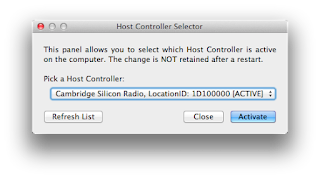
Okay, so, I have this working - not 100% seamlessly and not quite as it should, but it does work. I had do download Bluetooth Explorer for Mac OS 10.7 (linked from the Hideez documentation ), and go into Utilities → HCI Controller Selection and manually specify the Cambridge Radio device: Once that was done, I could go into the Bluetooth Setup Assistant and pair the Air 75 with the MacBook as normal (hold down Fn-1, Fn-2, or Fn-3 to select a Bluetooth profile; the left side light will blink blue when the keyboard is ready to connect, and the blinking will be faster when it’s ready to pair). A stumbling block: I’ve punched in the below terminal command multiple times and the switch to the USB Bluetooth adapter never “sticks” across reboots. Option-clicking the Bluetooth menu item shows the address 00-1B-63-47-6A-4D, which comes up as an Apple device when I search . After I switch using Bluetooth Explorer, it lists 00-1A-7D-DA-71-03, which shows up as “cyber-blue(HK)Ltd.” $ sudo nvram bl...

The ultimate lap desk setup.

Image
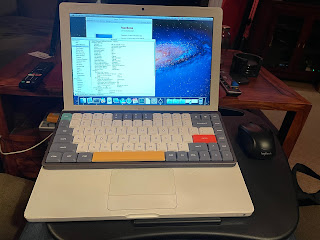
I’ve been trying to find a good “kick back on the sofa with the dogs and still get work done” solution that doesn’t kill my back, neck, etc. I think I may have found it: Any Mac laptop (or any laptop, really) with a compatible keyboard (basically, anything with the chiclet keyboard made between 2006 and, as I understand it, 2019 - I’ve used it successfully now with 2020-era Intel MacBook Air laptops, too). In this instance I’m using a Mid-2007 MacBook Core 2 Duo. NuPhy Air 75 keyboard . I’m using one with “brown” switches, via Bluetooth. It’s designed specifically to sit on top of the laptop keyboard and not interfere, and is a much nicer typing experience than the built-in keyboard, especially the ancient MacBook keyboard, which wasn’t amazing to begin with and has gotten mushy over time. (This Mac required an aftermarket Bluetooth 4.0 adapter to work with the NuPhy keyboard. It’s kind of a kludge but it worked. The bundled 2.4 GHz NuPhy dongle is another option, or you can connect i...

A tale of three portable keyboards

Image
Epomaker NT68 First, the one I was the most excited about, the Epomaker NT68. This one isn’t low profile, and uses standard MX style switches (which can be hot swapped). The one I ordered came with Epomaker’s Chocolate Rose switches, which have a nice feel to them - nicely tactile, with the bump at the very top. But they’re loud - thoccy - and not the best choice for a portable board I’ll want to use anywhere. So I’m going to swap it to Boba U4 switches. Anyway. My two gripes: It took me a minute to figure out how to fold the case to support an iPad (and even then, the 9.7 Pro can best be used only in landscape mode; portrait mode is usable but not very stable), and, the backlighting, in addition to being a battery drain, is aesthetic only; the keycaps (which use the relatively rare DSA profile) are Properly folded, the NT68 case supports an iPad not shine-through, so the back lighting doesn’t really help with low light usability. (At least one review suggests that Cherry p...

Dual Booting the MacBook: Linux and OS X

Image
Building on my experience getting a reasonably usable Lion install going , and finally getting Linux up and running ... I wiped the 120GB SanDisk drive and installed Lion first, partitioning the drive in two and setting the second partition up to be “free space.” I had kinda borked the install the first time around, and could not figure out why the USB installer was booting straight into the “Installing” screen and then throwing an error: “There was a problem installing ‘Mac OS X’. Try reinstalling. Rebuilding the USB installation media, and zeroing and repartitioning the hard drive, had no effect. Turns out I needed to zap the PRAM (start up the machine holding down Command-Option-R-P). I then installed Lubuntu in the unused space, with a 200MB /boot/efi FAT32 partition (with the “boot” flag set), and a 1GB swap partition. Everything seems to work great, I can boot between the operating systems by holding down the “Option” key at startup. Best of both worlds. I get the...

Getting Linux installed on an ancient MacBook

Image
The Centon "Diamond Series VS1" 60GB SSD I tossed in my old MacBook about 6 years ago died suddenly and without warning. I happened to have a SanDisk 120GB drive I recently took out of a small server floating around, so I finally got around to getting Linux installed on this thing. (Typing this on it now.) I've tried doing this before and always gave up. I wasn't sure if I had a USB drive that was compatible, etc. The key is patience. A lot of patience. I started off with one of the Matt Gadient ISO images (specifically lubuntu-20.04.1-desktop-amd64-mac-mattgadient.com.iso), and followed the instructions found on Stefan's page . I used a 2GB partition on a cheap 16GB USB flash drive I had within arm's reach (it identifies itself as vendor_id abcd, product_id 1234, product "UDisk" manufacturer "General" ...). When I booted the MacBook with the USB drive inserted, I smashed and held the Alt/Option key immediately after I hit the power button...

RIP MacBook

Image
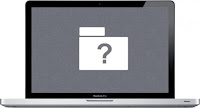
I gave it a shot. Back in 2015 I picked up some cheap pieces to revive a 2007-era MacBook. Cheap 60GB SSD, cheap battery, maxed the RAM to 3GB. It ran Lion and would sync music to my then-girlfriend’s iPhone 5C, and ran her Nintendo emulator. Success. Recently, I got  enough usable software running to keep it out of the eWaste bin, but then the battery gave up. Then, I nudged it and knocked the magsafe connector loose, and it instantly lost power. Hooking it back up to the AC adapter, I got the dreaded blinking questionmark. Tried burning a Lion install disc or a Linux installer (one of Matt Gadient’s excellent builds ), but the spindle of no-name optical blanks I had left over from who knows when, all burned coasters. Meh. Finally burned  Fedora-Xfce-Live-x86_64-31-1.9-mac-mattgadient.com.iso  on quality media and it worked ... And I learned the SSD is no longer recognized by the system. I have a 120GB SATA SSD I took out of the NAS box when I upgraded it, so I coul...

Java 7 and other modern(ish) software on OS X 10.7 Lion

Image
I have an old “Mid-2007” MacBook (Core 2 Duo, upgraded with 3GB RAM and a 60GB SSD), that’s well past its prime, but still works fine. (The battery, swapped in 2015, only has 25 cycles on it.) I gave up trying to get Linux installed on it, and although somewhat more modern versions of OS X have been hacked to work on it, Lion works well enough for most things and is actually supported, vs. being a mostly-working-but-broken-in-various-aspects hack. (I respect a good hack, but when the screen doesn’t redraw properly...) So, it’s a frozen in time machine running OS X 10.7.5, “Lion,” an operating system dating back a decade or so. All is not lost, though. I installed Arctic Fox for web browsing. Frustratingly, because GitHub has deprecated older TLS mechanisms, I had to download the browser on another machine and copy it over using Screen Sharing. (I get the impetus behind HTTPS Everywhere, but for simply retrieving open source code from a site like GitHub, in my opinion users should...