Posts

Showing posts with the label MechanicalKeyboards

A tale of three portable keyboards

Image
Epomaker NT68 First, the one I was the most excited about, the Epomaker NT68. This one isn’t low profile, and uses standard MX style switches (which can be hot swapped). The one I ordered came with Epomaker’s Chocolate Rose switches, which have a nice feel to them - nicely tactile, with the bump at the very top. But they’re loud - thoccy - and not the best choice for a portable board I’ll want to use anywhere. So I’m going to swap it to Boba U4 switches. Anyway. My two gripes: It took me a minute to figure out how to fold the case to support an iPad (and even then, the 9.7 Pro can best be used only in landscape mode; portrait mode is usable but not very stable), and, the backlighting, in addition to being a battery drain, is aesthetic only; the keycaps (which use the relatively rare DSA profile) are Properly folded, the NT68 case supports an iPad not shine-through, so the back lighting doesn’t really help with low light usability. (At least one review suggests that Cherry p...

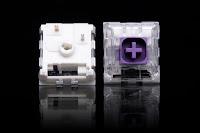
Boba U4 mini review

Image
Swapped the Boba U4 RGB 62g switches into a Keychron K8 . Holy isht, these things really are silent! Like, this is probably quieter than the rubber dome OEM Dell board our receptionist uses. Nicely tactile, though lighter than what I'm used to (daily drivers are an RK71 with Box Pinks, another K8 with Box Jades, a K6 with Box Royals, and I have a couple of Box Navy / White / Pale Blue boards I tried out while I was transitioning from buckling spring). So far, this is my GOAT. There is zero keycap wobble with this setup (stock Keychron keycaps), the “bump” is right at the top of the travel, and my typing accuracy is where I expect it to be. I’m sold. Why did it take me this long to discover and finally try these switches? One thing to note: Ali Express ships them loose in a bag, just like the switches I’ve ordered from NovelKeys etc., but for some reason it seemed like an inordinate number of these arrived with askew pins I had to gently bend back into place. I also had a tough tim...

Work from Home Setup - Holiday Wireless Edition

Image
The balcony iMac has moved inside for the winter. The Labrador is, at 2 ½  years old, still not to be trusted. The combination has my dining room table sharing space between the tree and the iMac. I just set everything up to be as comfy as possible. Pictured: The  Bose QC35 II  headphones, a very competent wireless headset for calls, Zoom meetings, etc. (Though of course, now apparently superseded by the QC45 model.) Minor annoyance: After about 3 years of light-to-moderate use, the leather on the earpads is starting to flake off. I have Wicked Cushions replacements on the way.  Keychron K8 with Kailh Box Jades (swapping to Boba U4 RGB 62g switches in an RGB / Aluminum K8 , as soon as they get here). Got this monitor stand with built in USB hub and wireless phone charger on a Black Friday sale. Cheap Bluetooth laser mouse (a $20  Insignia NS-PNM3B8BK , works surprisingly well; side button functionality enabled with SensibleSideButtons ). Noble Fir 5'...

iPad Mechanical Keyboards - Success and Redux

Image
  I wrote earlier about trying to find a mechanical keyboard setup for an iPad . After finally retrieving my iPad Pro 9.7 from the trunk of a car that’s been in the shop since June (sigh…), I can now attest: This solution rocks. MakerMade3D’s one-off (so far?) 3D-printed “bezel” holds the iPad perfectly (with one caveat, if the feet on the K2 aren’t flipped down, small or large, the setup will rock a little bit on a flat surface. Flip those down and it’s rock solid. The setup is a Keychron K2 with Kailh Box Navy switches, which are heavy … Pondering swapping them out for Boba U4  “silent tactile” switches. (Update: Ordered from Ali Express with a delivery date about 6 weeks out, no one had the RGB 62g in stock, but I may have a line on them through reddit…) Meanwhile, two three new contenders have come to my attention: NT68 The Epomaker NT86 seems to be the perfect iPad mechanical keyboard. I’m told they’ll be shipping in December, after the Kickstarter backers’ units have...

Drop ENTR, Halo True

Image
So I got a new keyboard. I wasn’t really in the market, but I’d been sort of spec’ing in my head what I would build next, and then Drop had a significant sale price on the Entr keyboard, which I could order with Halo True switches (a Redditor’s review ), and it came with a second set of keycaps (from multiple options)... This checked all the “must have” boxes for my use case (no RGB or wireless, but this application doesn’t “require” either). So. Yeah. Here we are. I got the “silver” keyboard with the “ Vintage ” Artifact Bloom Series Keycap Set (Cherry MX profile). (The replacement keycaps aren’t backlit like the stock keys, but they’re much more stable ( one reviewer noted how “wobbly” the stock keycaps are ; that problem all but disappears with these keycaps). Of course, I created a custom Karabiner complex modifications setup . I was hoping to remap F1, F2, etc. to the F1, F2 keys, but for some reason that’s not working. Not critical, I’ll dig into that when I have more time. For...

Moar tactile...

Image
So the Etsy maker I’ve been talking to has started to prototype the Keychron K2 iPad stand. Test pieces came in the mail today. I’ll use it with my Kailh Box Navy swapped K2 , but that’s not a universal solution; I can imagine being relatively unpopular indoors at a Starbucks with the thicc clicc, or on an airliner, or ...  So I’m pondering “building” another K2, with tactile switches, as quiet as I can get ’em while still having that crisp tactile “bump.” After a related discussion on r/MK, I’m contemplating: Gazzew Boba U4 (aliexpress pearl top / clear top  ($68 for 90) |  mkultra  | theremingoat review ) Zeal Zilent ( zealpc.net  ($88.40/80)) Everglide Moyu Black a/k/a Dark Jade ( theremin goat review ) (though these don’t seem to be silent?) ( amazon  | kprepublic ($87/90)) Pricier than the Kailh Box switches I’ve been using to date, but might be worth checking out.

Kailh Box Royal

Image
These just shipped. Should have them by the end of the week. Looking forward to seeing what’s what. From my brief experience with a keyswitch tester, I wasn’t sure I’d like them, and the Burnt Orange felt better. But those weren’t awesome. So, going to hot-swap to Kailh Box Royal switches. People seem to like them: The Kailh Box Royals are what I was expecting from a "tactile switch". ( pol-delta ) Box Royals are the fucking GOAT ( Past-Chest-6507 ) They really are. Best tactile switch straight out of the box besides Zealios. ( jrau ) these switches are something that I enjoy quite a lot. Very tactile :) ( WindmillArtGuy ) I use Box Navy and Jades Just got a board of Kailh Box Royal and they are fantastic. Have the tactility and the resistance that us box Navy folks love 😀 ( abdulqadirali ) Box Royals were just... alright. i found the dropoff way too sharp. the tactility was barely there. ( hammerbrotha ) I love Box Royals, almost close to Zealios crossed with Box Navy! ( Bi...

Keychron K6 with Kailh Box Burnt Orange Switches; Another RK71 with Box Pink Switches

Image
Tactile Build (K6 + Burnt Orange) For my second tactile mechanical “build,” I went with the Keychron K6  (hot swappable, aluminum frame, RGB) and the Kailh Box Burnt Orange switches (also available(?) from AliExpress ). My switch tester suggested that switch would feel better than the Box Royal; now that I have a full keyboard with the setup, I’m not sure about that. The RK71s with the Kailh Box Hako Royal Clear switches requires more force and feels more “crisp.” The Burnt Orange switches activate right at the top of the switch’s travel and have a bit of resistance, but I’d prefer a bit more. It might be worth getting another set of Hako Royal Clear switches (before they’re gone forever), as the set I have now is soldered into the RK71, and maybe a set of the Royals just to try them out. Edit: Doing a bit of digging (which maybe I should have done before I pulled the trigger, keyswitch tester experience notwithstanding). I endorse these opinions (except for the parts that are st...

The search for a mechanical iPad keyboard

Image
Mocking up a holder for the Keychron K2   I’ve long been on a quest to find a decent keyboard to use with an iPad. A decade or so ago I tried the ZAGGmate case and then the ZAGGkeys Solo ; more recently, the Logitech K480 , a BrydgeAir , keyboard covers like the Logitech Canvas  or Focus  (used with an iPad Mini, they’re great for what they are, but the form factor precludes using them for much real work). I’ve even used an older version of the Handheld Scientific Bluetooth Keyboard Adapter to hook up my old Razer (before I modified it ) - not *quite* as messy as using an Apple Extended Keyboard II with an iPad , but close. But what I’m really looking for is a mechanical keyboard I can use with a 9.7” Pro, conveniently. (The less said anout the abominations that look like vintage typewriters, the better.) I could use the Keychron K2 - it’s almost the perfect size, and Bluetooth. But then I need a stand  to prop up the iPad - one more thing to tote around and keep...

Royal Kludge RK71 with Tactile Switches, Karabiner Customized Key Mapping for Macintosh

Image
So apparently I’m building a Royal Kludge RK71  (stock: White, RGB lighting, brown switches; found one in condition “Good - Acceptable” for pennies), with Kailh Hako Royal Clear switches. (Discontinued and on sale.) Found the switch tester I picked up a while ago, and it was - kind of as expected - between Box Royal switches and the Hako Royal Clear, and the Royal Clears felt just a little bit better. Night and day compared to the Box Browns  (and I’ve tried, and hated, “regular” brown switches from Cherry, Gateron, Outemu, etc). A full keyboard with the tactile switches should be interesting, the form factor is good for this application (and it has a Mac layout built in as a layer, with Command/Option legends on the meta keys). This board is soldered, not hot swap, so the soldering station gets a chance to continue to pay for itself. At least now I have experience and confidence ! Other peoples’ videos: Royal Kludge RK71 v2 Review How to Disassemble a Royal Kludge RK71 Up...

Modded Razer BlackWidow Tournament Edition Stealth (2014)

Image
Fin . File this project under “finished.” It started off as desoldering / soldering practice on a disposable board. Now I really like typing on it. Not as much as on a board with Navy switches, but enough to keep it and use it. Keyboard Switches: Mostly Kailh Box White switches (surplus from a GK705 that’s now setup with Pale Blue switches), with two surplus Kailh Box Navy and one Kailh Box Blue switch I had handy. The CapsLock, F9, F10, and ScrLk keys were installed with embedded LEDs so I left them as-is; they’re still the stock Razer Orange switches Keycaps: Mostly OEM, but having lost the F8 keycap I swapped in: A  Nuclear Cherry MX Keycap  and, for the hell of it, a  Red PBT Doubleshot Cherry MX Keycap  for the Esc key. (And, of course, shortly after ordering those, found multiple sellers on eBay and elsewhere parting out these keyboards, and ordered a replacement F8 key for about $7 shipped.) The two wasd keycaps (left) and an OEM keycap from a GMMK keyboar...

Naked Das Keyboard

Image
Last summer, I  picked up  a used Das Keyboard Model S Professional for Mac ($49 on eBay), which shipped equipped with Cherry MX Blue switches. (Side note, I have no idea how old this board is, but the PCB has a 2009 date on it...) The Blue switches never connected with me, and it’s been collecting dust for a while. But I like the board generally - it’s got a handy built-in USB hub, the key layout is Mac-standard by default (don’t have to remap anything in software), etc. So, I’m going to swap it to Kailh Box Navy switches ( Novel Keys or KBDfans ). Why? This: I don’t have the switches yet (they’re ordered, but haven’t shipped; the Navy switch in the above video is left over from another swap), but figured I’d get ahead of the game and strip out the Blues. I found this tear-down guide , which was handy. With the cheap tools I got (delivered on Friday), especially the thin plastic pointed 5" long spudger(?), I was able to gently pry up the “hooks” and, contrary to that guide,...

Screwing up, and fixing it (bridge fix for a lifted pad, soldering a mechanical keyboard)

Image
I have an old Razer BlackWidow Tournament Stealth Edition keyboard I picked up about 6 years when I was temporarily afflicted with an open office. The Razer brand orange switches were never quite to my taste, so it’s mostly been collecting dust. (I also lost the F8 key cap a while back.) Perfect sacrificial lamb while I learn how to desolder, solder, etc. (I'm waiting on some Kailh Box Navy switches to arrive and then I plan to modify a Das Keyboard Model S Professional For Mac - which I actually  do  care about). I had a set of Kailh Box White switches left over from a GMMK I swapped to Pale Blue; several of them went into a numeric keypad that was my first attempt at replacing soldered switches . With almost enough to swap everything on this board (especially since some of the orange switches have built in LEDs and would be sticking around), figured, more practice is never a bad thing. I  almost  got it perfect the first time, but borked pads at the space bar a...