Posts

Showing posts with the label MagSafe

My new favorite battery pack

Image
I was intrigued by the Ridge pack ¹  that can also charge an Apple Watch, but at $80 it wasn’t an impulse buy. But then I saw this Energizer SKU (QM10010PQ) selling for $35 and it was a no-brainer. 10,000 mAh battery pack (38.5 Wh) with MagSafe charging for an iPhone or an Apple Watch (the latter is the killer app feature), plus two USB-C cables on the back for charging an iPad or MacBook Air, plus another USB-C port that can be used for charging the device (or you can hook up its built-in USB-C cable, USB 1, to charge - and I confirmed, it charged – albeit slowly, at ~10W – off the built in USB-C ports on the Solterra. Built in kickstand. It doesn’t have a ton of capacity and it’s not the fastest charger, but as an all-around device I’m likely to actually have with me, it’s the most flexible thing I have in my arsenal. Now I don’t have to lug around a separate watch charger device (though this Belkin has served me well), and/or I can somewhat declutter my pencil case , maybe......

GOAT (for now) Mobile MagSafe charging solution

Image
For the Solterra, for my iPhone 16 Pro with the unreliable USB C port, I wanted something that would hold the phone visibly and securely  and charge it with a decent amount of juice, and ideally with cooling. (I was waiting for TackForm to bring the CR07 back, but, alas, support confirmed it’s been discontinued.) The components I currently have, which work together brilliantly: The vent hook module from this: Coolpow for MagSafe Car Mount【Windshield+Vent+Dash】Magnetic Phone Holder  (the phone holder component works well, too, but doesn’t charge). It has a 17 mm ball so interoperates well with other hardware. This Anker 67W 3-Port USB-C Car Charger (the ESR below comes with its own 12V charger, but I know and trust the Anker, which is a little more flexible[1]; if I didn’t already have the Anker, the adapter that comes with the ESR is I’m sure fine...) [Edit: If I had it to do over again, I’d probably go with the  167.5W Anker charger instead; it’s $38 but USB...

USB-C Extension Cable for Power Delivery

Image
After seeing the impact a dual Xeon RX 580 GPU etc. Mac Pro 5,1 had on my electric bill, I’m spinning that beast up only when necessary! So I’ll be using the laptop slot I had built into my computer stand more and more. Which means having power cables draped everywhere from the grommet insert is less than ideal. So...  Anker MacBook Pro Charger, 100W USB C ($30 and comes with a 5' USB-C cable) Faracent USEC-2M 2 meter USB-C extension cable ($14 and purportedly transmits up to 5A, so, a full 100W ) The extension cable is necessary so I can have the wall wort plugged into the UPS on the floor and have an easily accessible USB-C female port I can plug a USB-C to USB-C cable, or for older and newer devices, a MagSafe cable, into, depending on what laptop is in the slot. I currently have it hooked up to a MacBook Pro 14" M1 Pro via an Apple MagSafe 3 cable and can confirm it’s negotiated 19.5V and ~.25A (which is what it was drawing connected to a 67W charger USB-C to USB-C, no ...

Upgrades, Accessories, and Supplying Enough Power to the Lightning to USB 3 Camera Adapter

Image
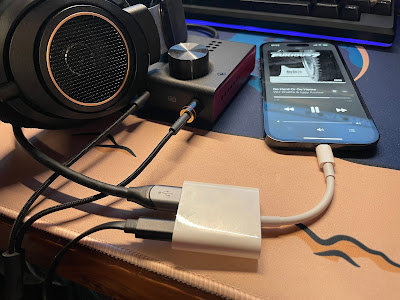
Lightning to USB 3 Camera Adapter for DAC / Amp Connection Picked up a “used – like new” Apple Lightning to USB3 Camera Adapter , which is specifically recommended by, e.g., DragonFly (“[i]n our tests, Apple's Lightning-to-USB 3 Camera Adapter (with charging port) sounds better and is more reliable than Apple’s less expensive Lightning-to-USB Camera Adapter, while also providing the ability to charge during playback”) and Schiit . Photos show, e.g., the DragonFly being used without external power, but mine won’t. In fact, basically nothing worked: Cannot Use Accessory AudioQuest DragonFly: This accessory requires too much power. Cannot Use Accessory SanDisk 3.2Gen1: This accessory requires too much power. The Schiit Fulla E, even when connected to a beefy USB-C power supply, just clicked in the headphones repeatedly, or every second would play a tone for a fraction of a second, click softly, go silent, and then repeat. Hooking up an external USB A to Lightning cable to provide po...

Living Room Charging Station

Image
Side table charging station tucked into corner; Anker charging station The station is built around a $35 HOOBRO Side Table with Charging Station, End Table with USB Ports and Outlet , which won’t be confused for Ethan Allen but snuggles into the available space perfectly and looks “fine.” (Certainly a lot better than the rat’s nest of cables that used to be in that void!) Also gives me a place to stash laptops, tablets, wireless keyboards, etc., that’s out of the way. The table has a built-in 110V outlet and (2) 10W (5V ⎓ 2A) USB-A ports, which is probably enough for impromptu / guest phone / watch / etc. recharging, but wasn’t quite what I needed from that space. So I added an Anker USB C Desktop Charging Station (623), with: (3) 110V outlets; (1) USB-C PD 45W port; and (2) 15W USB-A ports. Although the power strip’s USB output tops out at 60W total (per the manual ), and 45W isn’t the most a MacBook Air can take (and less than the stock charger for the MacBook Pro provides), 45W of ...

iPhone 14 Pro Charging Station

Image
It was time to replace the generic “Wireless Charging Stand” (Input: DC 5V / 2A, Output: DC 5V / 1A - yeah, a blistering 5W) I’ve been using at the office since 2017 or so, when I got my iPhone X. The 14 Pro has a larger camera bump and the phone wouldn’t sit flush, and I wanted newer, better, faster charging tech. The main issue I found is that many of the chargers out there will say MagSafe but they really mean “regular Qi charger with some magnets in the right spot to attach a MagSafe phone.” Most of them top out at 7.5W and don’t have any of Apple’s intelligent capabilities (like thermal suspension). So I picked up: An actual Apple MagSafe Charger puck (another one; I now have one in the Jeep , this one at the office, and one on its way for the living room, plus the Belkin MagSafe 3-in-1 on my bedside table) [$30]; A Spigen Mag Fit S mount that seems really well constructed [$20]; A UGREEN USB-C extension cable (USB-C to USB-C extension cables are pretty hard to find!) that wor...

MagSafe FTW

Image
With the Jeep now sporting a spiffy wireless CarPlay display, my phone was floating more than it used to. I hate that. I also wasn’t wild about constantly hooking up a Lightning cable to charge it. (I’ve been using a 12V USB-C to Lightning setup ). I’ve been adopting wireless charging more and more over time: At the office I have a wireless charging stand like this . At home in my living room, a RAVPower Fast Wireless Charging Pad (5W for the iPhone) (man, RAVPower fell from grace fast, there’s no trace left on Amazon ). My home work station uses a Vaydeer USB3.0 Wireless Charging Aluminum Monitor Stand Riser . On my night stand I’ve cycled through: An iHome wireless charging alarm clock . Impossible to read from bed, and charging my watch meant the clutter of a USB cord hanging off the back of the radio. A COLSUR Desk Lamp with Wireless Charger . I tried really hard to make this work. It feels (and looks a bit) cheap, but it checked the boxes. But the light flickers. The watch charge...