Posts

Showing posts with the label iphone

My new favorite battery pack

Image
I was intrigued by the Ridge pack ¹  that can also charge an Apple Watch, but at $80 it wasn’t an impulse buy. But then I saw this Energizer SKU (QM10010PQ) selling for $35 and it was a no-brainer. 10,000 mAh battery pack (38.5 Wh) with MagSafe charging for an iPhone or an Apple Watch (the latter is the killer app feature), plus two USB-C cables on the back for charging an iPad or MacBook Air, plus another USB-C port that can be used for charging the device (or you can hook up its built-in USB-C cable, USB 1, to charge - and I confirmed, it charged – albeit slowly, at ~10W – off the built in USB-C ports on the Solterra. Built in kickstand. It doesn’t have a ton of capacity and it’s not the fastest charger, but as an all-around device I’m likely to actually have with me, it’s the most flexible thing I have in my arsenal. Now I don’t have to lug around a separate watch charger device (though this Belkin has served me well), and/or I can somewhat declutter my pencil case , maybe......

Transferring files to Kindle from iPhone over USB C

Image
So I figured this should work, and, it did ... Had my  jailbroken Kindle  with me at Disney California Adventure the other day, and my iPhone 16 Pro and a  USB C FuelRod charging kit , but no laptop or anything else. I connected the Kindle to my phone with the short USB C / USB C cable from the FuelRod, and sure enough, it appeared in the Files app on the phone. The process isn’t the most straightforward and somewhat counter-intuitive, but it worked. Go into the Files app and long-press the content (files or folders) you want to copy to the Kindle (in my case, some files from the Reader directory in my GoodReader app , which syncs to my NAS). Long-press and select “Move” ( not  “Copy”) from the menu that appears (even though you probably want to copy  the content, not relocate it): In the files browser that pops up, navigate to the destination (e.g., the books folder on the Kindle), and tap Copy in the upper right corner: If you tap the progress pie chart near t...

Portable iPhone workstation (stand, keyboard)

Image
I’ve been using an ancient (2004?) Think Outside XTBT01 (a/k/a iGo Stowaway) Bluetooth pocket keyboard, and it does the job well enough. I like that it uses AAA batteries and won’t be eWaste when the battery chemistry eventually degrades past the point of usability. But. It’s kind of a cramped keyboard, the “Del” key being right next to the right arrow key f’s with my muscle memory, and it’s rare and expensive enough I think twice about taking it places where it might genuinely be useful. So. When I found the Rovinda Foldable Bluetooth Keyboard for $25 on Amazon, I decided to give it a spin. (I really wanted to try the  ROYAL KLUDGE F68 for the low profile mechanical switches, but the 12" length meant it wouldn’t fit in a Loungefly , and it would be otherwise pretty awkward to carry out and about in most circumstances.) I like it well enough. I need to re-learn how to type (using the home row this time, not whatever it is I’m doing now). It folds up nicely, it’s compact and...

Upgrades, Accessories, and Supplying Enough Power to the Lightning to USB 3 Camera Adapter

Image
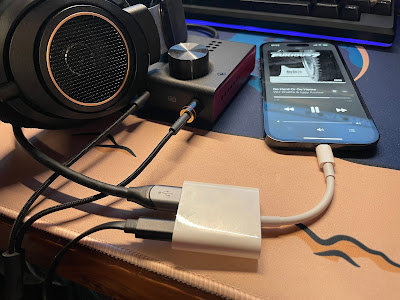
Lightning to USB 3 Camera Adapter for DAC / Amp Connection Picked up a “used – like new” Apple Lightning to USB3 Camera Adapter , which is specifically recommended by, e.g., DragonFly (“[i]n our tests, Apple's Lightning-to-USB 3 Camera Adapter (with charging port) sounds better and is more reliable than Apple’s less expensive Lightning-to-USB Camera Adapter, while also providing the ability to charge during playback”) and Schiit . Photos show, e.g., the DragonFly being used without external power, but mine won’t. In fact, basically nothing worked: Cannot Use Accessory AudioQuest DragonFly: This accessory requires too much power. Cannot Use Accessory SanDisk 3.2Gen1: This accessory requires too much power. The Schiit Fulla E, even when connected to a beefy USB-C power supply, just clicked in the headphones repeatedly, or every second would play a tone for a fraction of a second, click softly, go silent, and then repeat. Hooking up an external USB A to Lightning cable to provide po...

FLAC Players for iOS

Image
Looking at FLAC players for an old iPhone I want to repurpose into a listening station (that I think I’m going to build around the JDS Atom 2 stack ?). Quick synopsis of the few I’ve looked at so far: VOX . Premium features, including basics like a parametric EQ and EQ presents, an ad-free experience, gapless playback, etc., are locked behind a subscription. $49.99 yearly or $4.99 monthly. Once I saw that pricing I stopped looking at it. Flacbox . Natively connects to WebDAV, SMB, etc. servers, along with the usual litany of cloud services. Premium is a lifetime purchase of $14.99 (with a free trial), and includes ad delete, an unlimited number of cloud services, downloading albums and playlists, an unlimited number of playlists and songs in a playlist, etc. Has a 10-band EQ with precise ± decibel settings per octave. A contender. Doppler . A 7 day free trial and then a one time $9 charge. Doesn’t connect directly to servers but helpfully links to instructions for how to mount servers ...

Android circa 2008

Image
Wow. “Google, the worlds biggest and most well known search company, has recently teamed up with Andy Rubin, the creator of the Sidekick, to create an operating system for many mobile platforms, called Project Android. ... Android also has a SDK that has already been released for developers to play with. Using Java, developers can make applications from scratch that do anything from enable you to check your email, to playing the hottest new game. Along with its operating system, Android relies on Linux 2.6 to run its core services such a security, memory, and any other behind the scenes work a computers operating system would normally do.” (There are times when I’d kill for the keyboard on my old BlackBerry devices ... But then I realize how much better the iPhone UX is and it passes.) https://theilife.com/2008/07/the-phone-to-beat-the-iphone-meet-googles-android/

iPhone 14 Pro Charging Station

Image
It was time to replace the generic “Wireless Charging Stand” (Input: DC 5V / 2A, Output: DC 5V / 1A - yeah, a blistering 5W) I’ve been using at the office since 2017 or so, when I got my iPhone X. The 14 Pro has a larger camera bump and the phone wouldn’t sit flush, and I wanted newer, better, faster charging tech. The main issue I found is that many of the chargers out there will say MagSafe but they really mean “regular Qi charger with some magnets in the right spot to attach a MagSafe phone.” Most of them top out at 7.5W and don’t have any of Apple’s intelligent capabilities (like thermal suspension). So I picked up: An actual Apple MagSafe Charger puck (another one; I now have one in the Jeep , this one at the office, and one on its way for the living room, plus the Belkin MagSafe 3-in-1 on my bedside table) [$30]; A Spigen Mag Fit S mount that seems really well constructed [$20]; A UGREEN USB-C extension cable (USB-C to USB-C extension cables are pretty hard to find!) that wor...

Protecting the iPhone 14 Pro

Image
iPhone 14 Pro, Spigen, Smartish I haven’t used a case on my phone since wrapping my iPhone 4S in a huge, clunky OtterBox over a decade ago. Apple’s phones were just too slick to hide them in a bulky sweater. But. After accidentally smashing my iPhone X outside of my Apple Care screen replacement window, I started thinking differently. My 12 Pro lived naked and has a couple of barely perceptible imperfections in the screen after 18 months. My 14 Pro got a case and a screen protector. Spigen Ultra Hybrid Case ($23). A simple one-piece affair that just sort of slips / snaps into place. It’s supposed to have anti-yellowing tech, we’ll see. It has the MagSafe ring in the back, is pretty slim and low profile. Remains to be seen how much protection it provides, but something’s better than nothing (theoretically), and this generally seems to be well reviewed. It’s just thick enough that if I set my phone on my old generic 5W Qi charger stand the phone doesn’t start to charge; if I kind of hol...

MagSafe FTW

Image
With the Jeep now sporting a spiffy wireless CarPlay display, my phone was floating more than it used to. I hate that. I also wasn’t wild about constantly hooking up a Lightning cable to charge it. (I’ve been using a 12V USB-C to Lightning setup ). I’ve been adopting wireless charging more and more over time: At the office I have a wireless charging stand like this . At home in my living room, a RAVPower Fast Wireless Charging Pad (5W for the iPhone) (man, RAVPower fell from grace fast, there’s no trace left on Amazon ). My home work station uses a Vaydeer USB3.0 Wireless Charging Aluminum Monitor Stand Riser . On my night stand I’ve cycled through: An iHome wireless charging alarm clock . Impossible to read from bed, and charging my watch meant the clutter of a USB cord hanging off the back of the radio. A COLSUR Desk Lamp with Wireless Charger . I tried really hard to make this work. It feels (and looks a bit) cheap, but it checked the boxes. But the light flickers. The watch charge...

Charging the iPhone 12 Pro with the Anker PowerCore Fusion 10000 and the Zendure X5 USB-C PD

Image
Hooked an iPhone 12 Pro up to an Anker PowerCore Fusion 10000 via an Anker USB-C to Lightning cable (through a Klein ET920 to measure performance). Started with the phone reporting 23% battery charge (the phone is about a year old and iOS reports the battery has degraded to 85% of its original capacity). The phone was kept on but unused, screen off, all radios (cellular, WiFi, Bluetooth) hot. The Anker charged the iPhone at about 18W (~9V ~2A) and after about 50 minutes, the phone is reporting 88% charge, charging has slowed to 5W (5V 1A) if not lower (I’m often seeing, e.g., 5.08V at 0.55A, about 2.8W), and 6 of the 8 “charge status” lights on the Anker remain illuminated. I can definitely live with those numbers. It took about another hour, and one more “dot” on the Anker, to bring the phone all the way up to 100% charge reported. The Klein logged 1343 mAh, and 9.925 Wh, of power transmission. The stock iPhone 12 Pro battery is a 10.78 Wh unit, probably closer to 9.2 Wh now. If 9....