Posts

Showing posts with the label microserver

Adventures in ancient tech - frustrations with the Gen 8 MicroServer

Image
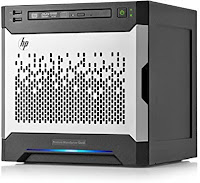
Xeon Been  flogging an HP ProLiant MicroServer Gen 8 for a while now . But I think its time may be coming to an end. It can’t boot the “optical drive” (slot 5) SATA device directly, need to have a USB stick or Micro SD card installed internally to do that. (Which failed last week. Replacing the old  SanDisk Cruzer Fit   with a  SAMSUNG FIT Plus . Second SanDisk I’ve had fail recently; the other was a  120GB 2.5" SATA SSD . Hrm.) iLO sucks, the iPad app crashes constantly, it doesn’t send mouse activity to Linux, etc. I tried using the Comet remote KVM , but I couldn’t get an any active VGA to HDMI adapters to generate a signal the KVM would recognize. So I did most of this stuff using a wireless Logitech K400 keyboard with trackpad and a tiny Eyoyo monitor . Works, but awkward. Can’t boot a GPT partition scheme (it’s got a BIOS and no UEFI), if you try you’ll get a red screen of death with an inscrutable “invalid op code” error. The most recent LTS version...

Finally installing Microserver upgrades; finding the iLO device and the client software

Image
For whatever reason I wasn’t able to find the HPE iLO (Integrated Lights Out) iOS / iPad client software in the App Store through a simple search, but I did find it when I went in under my apps. Anyway, here’s a link:  https://apps.apple.com/app/id497560256 Then, in the chaos of redoing parts of my home LAN (wiping and installing latest software, etc), I had yet to setup a DHCP reservation for the iLO interface on my HPE ProLiant MicroServer Gen8. A quick Google search revealed it uses the seldom used ports 17988, 17990, and 9300 for its remote console functionality, so I fired up nmap and scoured my network for machines with those ports open: $ nmap -p17988,17990,9300 75.748.86.0/24 --open   Nmap scan report for undefined.lan (75.748.86.91) Host is up (1.8s latency). Not shown: 1 closed tcp port (reset) PORT      STATE SERVICE 17988/tcp open  unknown 17990/tcp open  unknown MAC Address: G0:1G:48:G7:G6:4G (Hewlett Packard) There it is... (MAC addr...

HP MicroServer Gen 8 - NVMe, Upgrading the SATA SSD, Installing Oracle Linux 8

Image
The centerpiece of my home LAN is an HPE ProLiant MicroServer Gen8 , that replaced an old N36L back in 2014. (The N36L was a great starter server, but the 2TB limit on drives and the lack of support for jumbo frames were ultimately pretty limiting.) According to the specs , it has: A Celeron G1610T (2.3 GHz/2-core/2MB/35 W) processor 2GB RAM (HPE Smart Memory, DDR3 Unbuffered, PC3L-12800E Dual Data Rate (DDR3) UDIMM) 3x 3GB/s SATA ports, two connected to non-hot-swap externally accessible drive bays, one that’s intended for an optical drive 2x 6GB/s SATA ports, connected to non-hot-swap externally accessible drive bays An on-board (internal) USB 2.0 port An on-board (internal) microSD socket A PCIe 2.0 x16 slot 2x rear, 2x front USB 2.0 ports 2x rear USB 3.0 ports (requires an OS to be running) 2x Gigabit Ethernet ports 1x Ethernet port for iLO Like many others, I’ve repurposed the optical drive bay to hold a boot drive. This used to be a 120GB SanDisk that served admirably, but s...