Posts

Showing posts with the label Charging

GOAT (for now) Mobile MagSafe charging solution

Image
For the Solterra, for my iPhone 16 Pro with the unreliable USB C port, I wanted something that would hold the phone visibly and securely  and charge it with a decent amount of juice, and ideally with cooling. (I was waiting for TackForm to bring the CR07 back, but, alas, support confirmed it’s been discontinued.) The components I currently have, which work together brilliantly: The vent hook module from this: Coolpow for MagSafe Car Mount【Windshield+Vent+Dash】Magnetic Phone Holder  (the phone holder component works well, too, but doesn’t charge). It has a 17 mm ball so interoperates well with other hardware. This Anker 67W 3-Port USB-C Car Charger (the ESR below comes with its own 12V charger, but I know and trust the Anker, which is a little more flexible[1]; if I didn’t already have the Anker, the adapter that comes with the ESR is I’m sure fine...) [Edit: If I had it to do over again, I’d probably go with the  167.5W Anker charger instead; it’s $38 but USB...

Charging an Apple Silicon MacBook Air

Image
Following up from my earlier observations ; a 13.6" MacBook Air M2 seems to settle around 65W (on an  Anker 100W charger , observed using a SABRENT cable with a built in display ) while charging from 37% SOC and being used with, e.g., a Bluetooth keyboard  ( 5.1 ) and mouse  ( BLE ), WiFi, and screen brightness turned up (while listening to streaming music via hardwired headphones ). So while 30W is what it shipped with[1], and what can reliably power and charge it, the modern Airs will take advantage of more power if its on tap - at least up to a point. MacBook Air M2 13.6" consuming 65W USB-C PD So, battery packs like the Zendure SuperTank Pro and Shargeek Storm 2 , Shargeek 140 , or even the Anker 20,000mAh Power Bank (A1383) (for basically one recharge, or a partial top-off if charging while using the computer), are still worth toting, even if I could get by with something with lower power output.

Solterra USB-C port charger specs

Image
On a 2024 Solterra Limited I did some light testing with a Klein ET920 meter  and think I have the capabilities figured out (I couldn’t find the specs anywhere). Solterra Limited USB-C port providing 5V⎓3A Testing with a ~50% charged iPhone 16 Pro, the Klein showed the Solterra delivering 5V and about 2A (and the Baseus PD 100W fast charging USB C cable with LED display cable was reporting 10W). Hooking up an M2 MacBook Air (also around 50% charged) saw 4.88V but drawing around 2.90A and the cable reported 13W. MacBook Air receiving 13W from the built-in USB-C port   So it seems like the Solterra USB ports are limited to 5V and up to 3A depending on what the device will pull. Meanwhile, I hooked up a $12 Anker 323 car charger (52.5 W) (model A2375; apparently, Anker has reused the 323 designation for multiple products), and ran its output through the Klein. The Anker’s output capabilities are listed as: USB-C: 5V⎓3A / 9V⎓3A / 12V⎓2.5A / 15V⎓2A / 20V⎓1.5A (30W Max) USB-A: 5V⎓...

A weekend with the Solterra

Image
This wasn’t a very typical weekend, but it wasn’t exactly unusual, so I thought I’d write it up to give a glimpse into what a real world weekend was like with a relatively limited range Solterra. There were other options than the ones I chose (e.g., I could have swung by the office to charge, or found a DCFC station), but these pieces fit together neatly enough. This is with a 2024 Subaru Solterra Limited, and I don’t currently have the option of charging at home. Friday I topped the car off at the office, charging to 100%, so, starting with a range of ~200 miles (temperature highs in the mid-60s, cooler at night, SoCal “winter”). That night, took my houseguests to dinner. Total driving about 11 miles. Didn’t record the State of Charge (“SOC”) because it didn’t matter, but it was probably down maybe 5%. ~190 miles remaining. Saturday morning we got up early and drove to Knott’s Berry Farm (where there are no chargers), probably doing 75+ mph to keep up with traffic. Call it 31 miles, a...

Solterra

Image
Eight days ago we leased a Subaru Solterra (manufactured by Toyota; joint-developed with the bZ4X). Incredible lease terms, a $7,500 credit (loophole), $8,500 discount ...  Subaru Solterra Limited in Smoked Carbon So far, mostly love it. This came with 157 miles on the odometer from the dealership, where it was charged to full and reported 247 miles of range); a week of normal driving later, it’s still at 70% charge with 232 miles on the clock. Being me, of course I’m tracking how closely the range estimates match reality with a Google Sheets spreadsheet, fed by a Google Forms interface for easy data input on the go.  What I like Overall, I really like this thing. The range is good (and so far, better than advertised). The price is certainly right. There are no really obnoxious blind spots. It has wirelelsss charging (Qi) that actually works, plus a USB-A port in the charging bay , plus 4x USB-C charging ports (two for the back seats). Wireless CarPlay that works well, no...

Upgrades, Accessories, and Supplying Enough Power to the Lightning to USB 3 Camera Adapter

Image
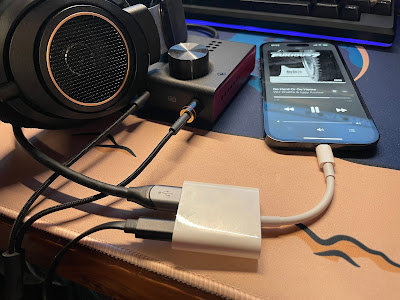
Lightning to USB 3 Camera Adapter for DAC / Amp Connection Picked up a “used – like new” Apple Lightning to USB3 Camera Adapter , which is specifically recommended by, e.g., DragonFly (“[i]n our tests, Apple's Lightning-to-USB 3 Camera Adapter (with charging port) sounds better and is more reliable than Apple’s less expensive Lightning-to-USB Camera Adapter, while also providing the ability to charge during playback”) and Schiit . Photos show, e.g., the DragonFly being used without external power, but mine won’t. In fact, basically nothing worked: Cannot Use Accessory AudioQuest DragonFly: This accessory requires too much power. Cannot Use Accessory SanDisk 3.2Gen1: This accessory requires too much power. The Schiit Fulla E, even when connected to a beefy USB-C power supply, just clicked in the headphones repeatedly, or every second would play a tone for a fraction of a second, click softly, go silent, and then repeat. Hooking up an external USB A to Lightning cable to provide po...

Flight Bag Power Capacity

Image
Trying to figure out how much battery capacity I need in my flight bag (the crappy 2.1A-shared Insignia just ain’t cutting it anymore). These aren’t ideal tests and I’ll redo them at some point with a work load going on while sipping USB power (which will hopefully recharge while providing operating wattage), but, here goes (readings taken with a Klein ET-920 ). iPad Mini 4, recharged from dead to full: 13:31  Dead   9-10W 14:10  17%     7.8W  1142 mAh 15:08  44%     7.4W  2720 mAh 16:50  84%       5W  4729 mAh 17:52  98%       5W  5387 mAh 18:14  Full    1.3W  5500 mAh ("Not Charging") So about 5500 mAh (realistically, with charging loss, ~8,000 mAh capacity on the charging pack), and requires about 10W at maximum to recharge. I’ll do a test with the screen on, connected to the Stratus GPS unit over WiFi, AS...

Living Room Charging Station

Image
Side table charging station tucked into corner; Anker charging station The station is built around a $35 HOOBRO Side Table with Charging Station, End Table with USB Ports and Outlet , which won’t be confused for Ethan Allen but snuggles into the available space perfectly and looks “fine.” (Certainly a lot better than the rat’s nest of cables that used to be in that void!) Also gives me a place to stash laptops, tablets, wireless keyboards, etc., that’s out of the way. The table has a built-in 110V outlet and (2) 10W (5V ⎓ 2A) USB-A ports, which is probably enough for impromptu / guest phone / watch / etc. recharging, but wasn’t quite what I needed from that space. So I added an Anker USB C Desktop Charging Station (623), with: (3) 110V outlets; (1) USB-C PD 45W port; and (2) 15W USB-A ports. Although the power strip’s USB output tops out at 60W total (per the manual ), and 45W isn’t the most a MacBook Air can take (and less than the stock charger for the MacBook Pro provides), 45W of ...

iPhone 14 Pro Charging Station

Image
It was time to replace the generic “Wireless Charging Stand” (Input: DC 5V / 2A, Output: DC 5V / 1A - yeah, a blistering 5W) I’ve been using at the office since 2017 or so, when I got my iPhone X. The 14 Pro has a larger camera bump and the phone wouldn’t sit flush, and I wanted newer, better, faster charging tech. The main issue I found is that many of the chargers out there will say MagSafe but they really mean “regular Qi charger with some magnets in the right spot to attach a MagSafe phone.” Most of them top out at 7.5W and don’t have any of Apple’s intelligent capabilities (like thermal suspension). So I picked up: An actual Apple MagSafe Charger puck (another one; I now have one in the Jeep , this one at the office, and one on its way for the living room, plus the Belkin MagSafe 3-in-1 on my bedside table) [$30]; A Spigen Mag Fit S mount that seems really well constructed [$20]; A UGREEN USB-C extension cable (USB-C to USB-C extension cables are pretty hard to find!) that wor...

MagSafe FTW

Image
With the Jeep now sporting a spiffy wireless CarPlay display, my phone was floating more than it used to. I hate that. I also wasn’t wild about constantly hooking up a Lightning cable to charge it. (I’ve been using a 12V USB-C to Lightning setup ). I’ve been adopting wireless charging more and more over time: At the office I have a wireless charging stand like this . At home in my living room, a RAVPower Fast Wireless Charging Pad (5W for the iPhone) (man, RAVPower fell from grace fast, there’s no trace left on Amazon ). My home work station uses a Vaydeer USB3.0 Wireless Charging Aluminum Monitor Stand Riser . On my night stand I’ve cycled through: An iHome wireless charging alarm clock . Impossible to read from bed, and charging my watch meant the clutter of a USB cord hanging off the back of the radio. A COLSUR Desk Lamp with Wireless Charger . I tried really hard to make this work. It feels (and looks a bit) cheap, but it checked the boxes. But the light flickers. The watch charge...