Posts

Showing posts with the label Apple

Keychron strikes again; macOS Bluetooth codec frustration; Blink camera battery life; and more!

Image
Qualcomm QCC5125 Package I got the BLT-2 (which apparently uses a Qualcomm QCC3034 chipset) in the mail today, and hooked it up. The manual I found online says it can work between two phones, but the manual for the device I got says it will remember up to 8 devices. Since I want it to work with both whatever laptop I might be cranking on, or at other times my phone, that’s perfect. So I set up my phone and my work MacBook Pro M1 Pro 14". A quick look at Console.app and it appears it’s still using the SBC codec - WTF? Digging into that. (Seems to be a common complaint, and the how to fix guides are all outdated .)  https://gist.github.com/dvf/3771e58085568559c429d05ccc339219?permalink_comment_id=4078721 Update: My Macs connect to many devices using AAC, including: A Loxjie A40 ( log ) (Qualcomm QCC5125) A FiiO BTR5-2021 ( log ) (Qualcomm CSR8675) EarStudio ES100 ( log ) (Qualcomm CSR8675) I’ve ordered a Blafili B3 (which apparently uses the QCC5125), fingers crossed. Blafili sup...

MagSafe FTW

Image
With the Jeep now sporting a spiffy wireless CarPlay display, my phone was floating more than it used to. I hate that. I also wasn’t wild about constantly hooking up a Lightning cable to charge it. (I’ve been using a 12V USB-C to Lightning setup ). I’ve been adopting wireless charging more and more over time: At the office I have a wireless charging stand like this . At home in my living room, a RAVPower Fast Wireless Charging Pad (5W for the iPhone) (man, RAVPower fell from grace fast, there’s no trace left on Amazon ). My home work station uses a Vaydeer USB3.0 Wireless Charging Aluminum Monitor Stand Riser . On my night stand I’ve cycled through: An iHome wireless charging alarm clock . Impossible to read from bed, and charging my watch meant the clutter of a USB cord hanging off the back of the radio. A COLSUR Desk Lamp with Wireless Charger . I tried really hard to make this work. It feels (and looks a bit) cheap, but it checked the boxes. But the light flickers. The watch charge...

The search for a mechanical iPad keyboard

Image
Mocking up a holder for the Keychron K2   I’ve long been on a quest to find a decent keyboard to use with an iPad. A decade or so ago I tried the ZAGGmate case and then the ZAGGkeys Solo ; more recently, the Logitech K480 , a BrydgeAir , keyboard covers like the Logitech Canvas  or Focus  (used with an iPad Mini, they’re great for what they are, but the form factor precludes using them for much real work). I’ve even used an older version of the Handheld Scientific Bluetooth Keyboard Adapter to hook up my old Razer (before I modified it ) - not *quite* as messy as using an Apple Extended Keyboard II with an iPad , but close. But what I’m really looking for is a mechanical keyboard I can use with a 9.7” Pro, conveniently. (The less said anout the abominations that look like vintage typewriters, the better.) I could use the Keychron K2 - it’s almost the perfect size, and Bluetooth. But then I need a stand  to prop up the iPad - one more thing to tote around and keep...

OWC Mount Pro 2.5" Drive Sled for 2009-2012 Apple Mac Pro

Image
I elected to go the cheaper, fast-enough-for-now route with my Big Sur volume in my mid-2010 Mac Pro. I mounted the 2.5" SSD to an  OWC Mount Pro Drive Sled ($15) instead of taking up my last free PCIe slot with another Accelsior S card . I may revisit that decision at some point, but for right now it’s not a priority. The fit and finish appear to be spot on, and the whole process was painless. In the box are the sled itself and four small screws to mount the SSD to the sled; the sled itself slides into place just like the OEM 3.5" units. Super easy, and I feel a lot better with the drive mounted, vs. hanging from the SATA connector (which worked very temporarily - SSDs are very light weight - but obviously wasn’t a durable solution).

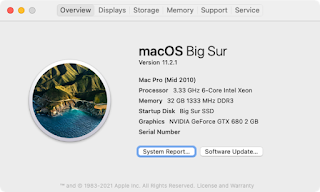
Installing Big Sur on a mid-2010 Mac Pro (MacPro5,1)

Image
Working. I successfully installed Big Sur on a “mid-2010” “classic” Mac Pro ( MacPro5,1 ). This required upgrading the video card (I went with a relatively inexpensive GTX680 I flashed with an Apple ROM) , but was otherwise pretty painless and a lot less involved than I’d been reading - which has me wondering if I’ve missed something? Obtaining the Installer Used a great script to obtain the Big Sur installation app directly from Apple, even though the computer I was using (Late 2013 iMac) isn’t supported: $ curl -o ~/installinstallmacos.py https://raw.githubusercontent.com/munki/macadmin-scripts/main/installinstallmacos.py $ chmod +x ~/ installinstallmacos.py $ sudo ./installinstallmacos.py  ...  #      ProductID    Version    Build   Post Date  Title  1      071-14766     11.2.3    20D91  2021-03-08  macOS Big Sur  2      001-68446    10.15.7  ...